
The plat component shows the device’s main parameters. This component is placed under the Service component, and is associated with the device hardware.
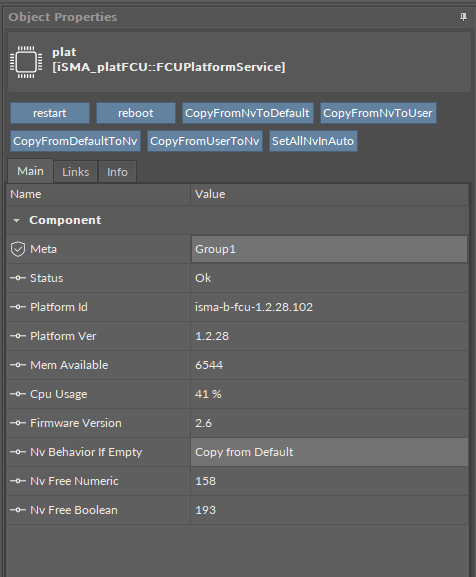
The plat component has the following slots:
-
Status: shows the platform status;
-
Platform ID: shows the platform ID;
-
Platform Ver: shows the platform version;
-
Mem Available: shows the RAM memory available in the controller;
Note: The whole application for the iSMA-B-FCU device cannot exceed 64 kB.
-
Cpu Usage: shows the CPU usage from the last 5 seconds;
-
Firmware Version: shows the controller’s firmware version;
-
Nv Behavior If Empty: if the non-volatile memory is empty after copying the NV component, the output value will be 0 (Leave 0 option) or it will be copied from the Default slot (Copy From Default option); the default option is to copy the value from the Default slot;
-
Nv Free Numeric: shows the number of available numeric non-volatile components;
-
NV Free Boolean: shows the number of available Boolean non-volatile components.
Note: Number of components physically added to the application does not have to be equal to memory cells. It can be calculated in the way shown below:
-
Each added NV Numeric (or Integer) component (not NV Net component) uses two memory cells–one numeric cell for value and one Boolean cell for Hand/Auto mode;
-
Each added NV Boolean component (not NV Net component) uses two Boolean memory cells–one for value and one cell for Hand/Auto mode;
-
Each NV Net Numeric component uses one numeric cell–these components work only in the Auto mode, so the memory cell is required only for the value;
-
Each NV Net Boolean component uses one Boolean cell–these components work only in the Auto mode, so the memory cell is required only for the value;
-
For Example, if 2 NV Numeric components, 3 NV Boolean components, 4 NV Net Numeric components, and 5 NV Net components are added to the application, the usage of memory cells can be calculated as follows:
|
Type of Component |
Number of Components |
Used Boolean Memory Cells |
Used Numeric Memory Cells |
|---|---|---|---|
|
NV Numeric |
2 |
2 (for Auto/Hand modes) |
2 (for values) |
|
NV Boolean |
3 |
6 (3 for Auto/Hand modes and 3 for values) |
0 |
|
NV Net Numeric |
4 |
0 |
4 (for values) |
|
NV Net Boolean |
5 |
5 (for values) |
0 |
|
Total |
|
13 |
6 |
Memory cells calculation
As presented in the table, this application uses 13 Boolean memory cells and 6 numeric memory cells. In this case, the Free NV Boolean and Free NV Numeric slots (under the plat component) will display:
-
Free NV Boolean: 227
227 = 240 (available Boolean memory cells) – 13 (Boolean memory cell used in application)
-
Free NV Numeric: 224
224 = 230 (available Numeric memory cells) – 6 (Numeric memory cell used in application)
The plat component offers the following actions, available in the context menu:
-
Restart: restarts the application (Sedona Virtual Machine);
-
Reboot: reboots the device;
-
Copy From Nv To Default: copies values from the Out slot to the Default slot in all NV components (see the NV component chapter);
-
Copy From Nv To User: copies values from the Out slot to the User slot in all NV components (see the NV component chapter);
-
Copy From Default To NV: copies values from the Default slot to the Out slot in all NV components (see the NV component chapter);
-
Copy From User To NV: copies values from the User slot to the Out slot in all NV components (see the NV component chapter);
-
Set All Nv In Auto: sets all NV components in the auto mode.