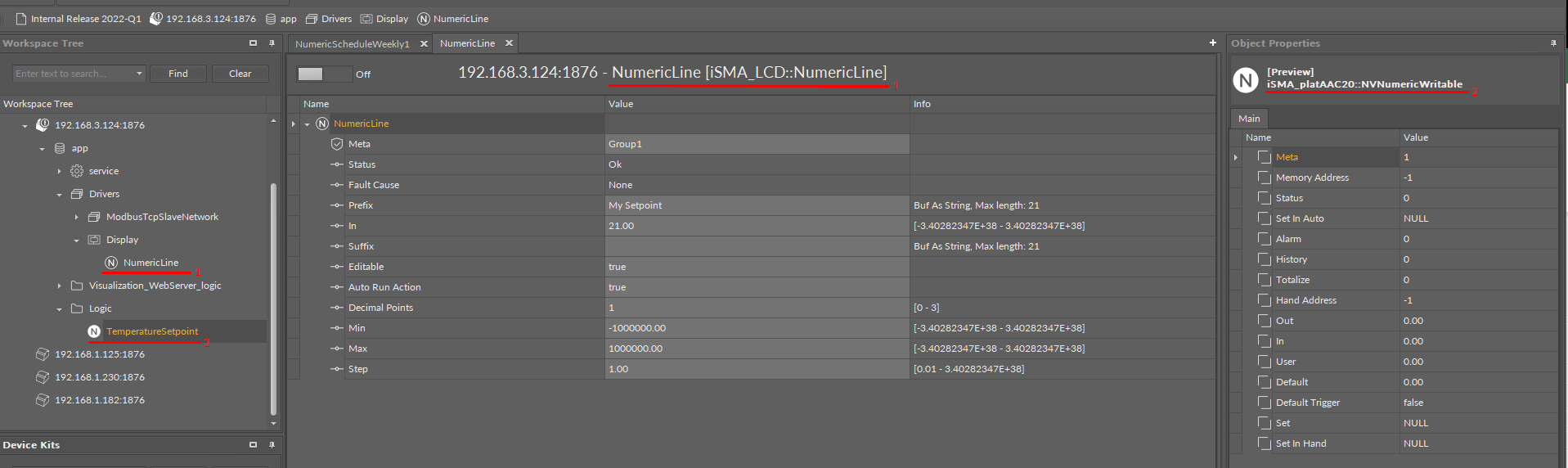
Issue
After adding to LCD the register responsible for the setpoint value, there is a problem with editing it, and the value is not saved after restarting iSMA-B-AAC20.
Possible cause and solution
Incorrect configuration of the NumericLine component slots or the LinkSet function is not in use.
Solution
-
Install the iSMA_LCD kit using the Kit Manager.
-
After installation, add the Display component from the iSMA_LCD palette under Drivers in the application.
-
Next, add the NumericLine component under the Display component.
-
The NVNumericWritable component, which acts as a setpoint, has to be linked with the NumercLine component (link from the Out slot to the In slot).
-
Then, configure the NumericLine component slots:
-
Suffix: text displayed left to the component’s value on the LCD, for example, ‘My setpoint’;
-
Editable: set to true.
-
-
The above steps allow to edit the setpoint’s value on the LCD screen for the NVNumericWritable component, which represent the setpoint value.