
Issue
Temperature readings from I/O modules are not consistent and the values are fluctuating.
Possible causes and solutions
-
Check if the wiring between the module and sensor is correctly connected.
-
Check if the problem persists if the sensor is connected to another input.
-
Check if there are no device interfering communication.
-
Parallel connect a 200 Ohm resistor.
-
Check the sensor’s instruction for correct power supply and grounding guidelines.
-
Appropriately set the input filtering time. Due to the high speed of AC signals, inputs may not correctly read lower frequency signals, such as 50 Hz. Filters ensure a more stable reading of these signals, eliminating erroneous readings.
-
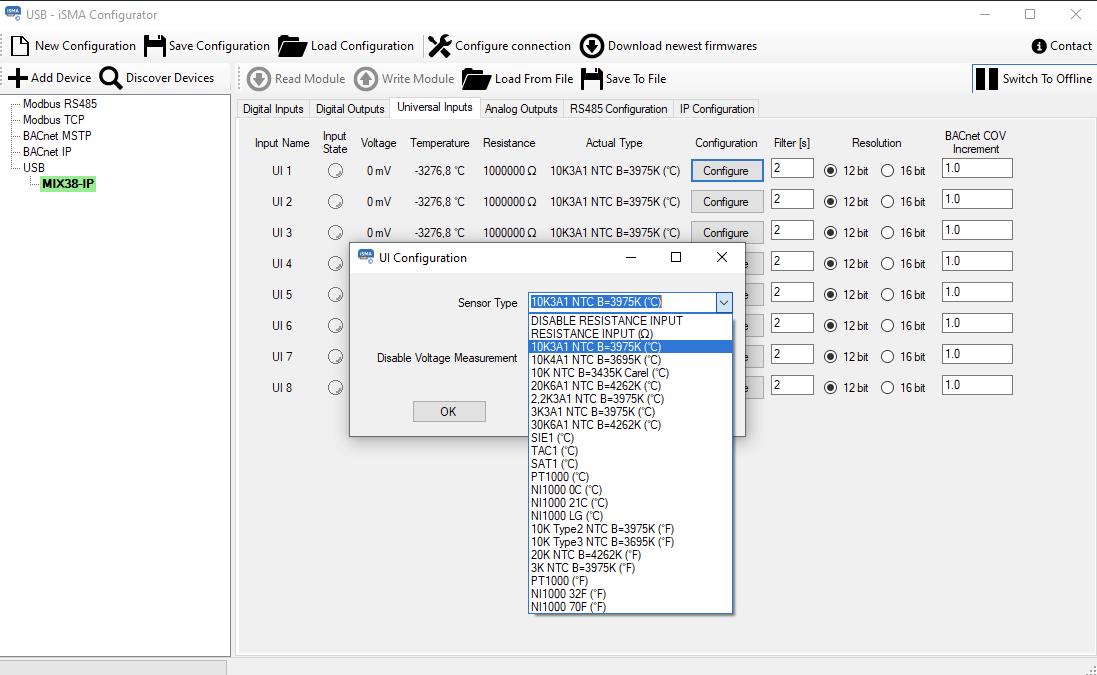
Check if a correct sensor type has been selected in the iSMA Configurator.
-
If Niagara 4.12 is used:
-
Update it to the latest 4.12 version or version other than 4.12;
-
If it is not possible to change the version, use the following configuration for points where the temperature is negative: Conversion = linear, Offset = -655.36. If this configuration is used together with a positive temperature, an error will occur.
-