
Issue:
When opening in the Internet browser views containing SVG files in the widgets, the Application Director displays the below logs:
WARNING [10:51:24 15-Sep-24 BST][webBrowser] Cannot initialize browser
SEVERE [10:53:34 15-Sep-24 BST][gx.image] Cannot load image "module://iSMA_EC_2D_Graphics/Blackline/Pipes/LightRed/BL_LightRed_Pipe_Hor_XXX.svg"
SEVERE [10:53:34 15-Sep-24 BST][gx.image] Cannot load image "module://iSMA_EC_2D_Graphics/Blackline/Pipes/Red/BL_Red_Pipe_Elbow_NW.svg"
The WB graphics module is installed on the controller:

Grpahics is displayed normally, but the logs keep appearing:

Possible cause:
The MAC36PRO controller in 4.13.2.18 version (and earlier) requires the web service to be configured differently than the default configuration.
Solution:
Go to the Config/Services/WebService/Warmup Config location and configure the parameters as below:
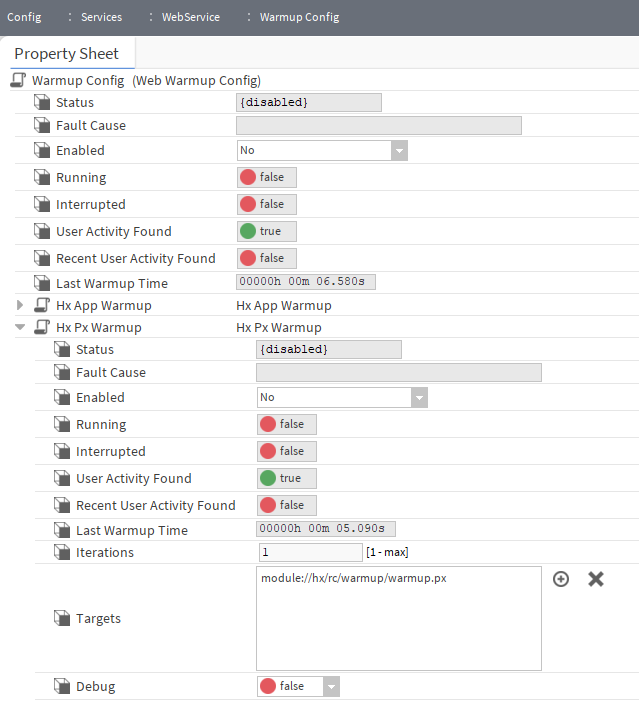
In short, set the Enabled slot of the Warmup Config and Hx Px Warmup components to No.