
The article describes how to add a symbolic link (symbolic link) to a Supervisor station, so that the contents of any station folder (e.g., storing PDF exports of reports) are saved in a different location than the location where the files of the running station are kept.
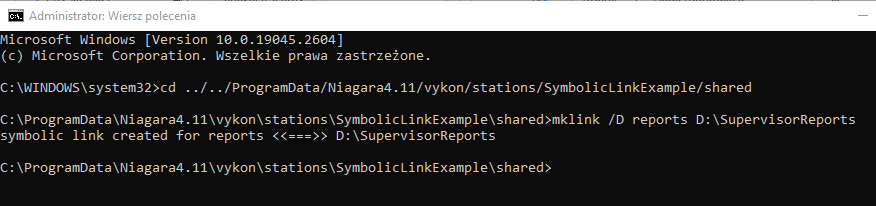
To this end, start the Windows command line as an administrator. Then use the cd command to navigate to the shared folder inside the running station. Below is a sample command for a station named SymbolicLinkExample:
cd ../../ProgramData/Niagara4.11/vykon/stations/SymbolicLinkExample/shared
The next step is to create a symbolic link using the mklink command. The following example command creates a symbolic link from reports, which will be created in the current location, to the D:SupervisorReports folder.
mklink /D reports D:\SupervisorReports
The correct creation of the link will be confirmed by the following message:
symbolic link created for reports <<===>> D:\SupervisorReports
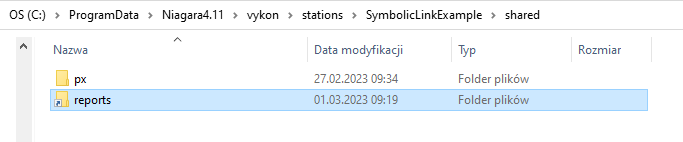
The view of the symbolic link in Windows:
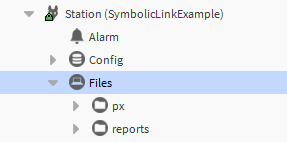
The view of the symbolic link in the Supervisor's station:
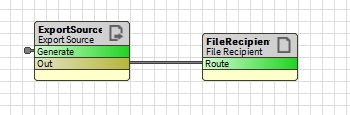
Now you can, for example, create an automatic export of the report to a file, so that it saves it in the symbolic link created earlier:
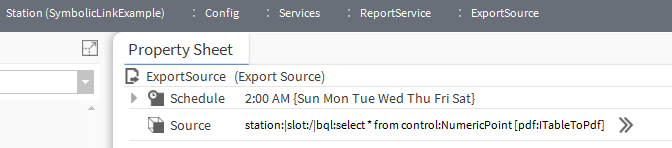

Once the report is generated, it is visible in the stati

But in fact, it is saved in the related link:
