The Trends Manager is a simple view containing the list of all trend extensions added to Data Points.
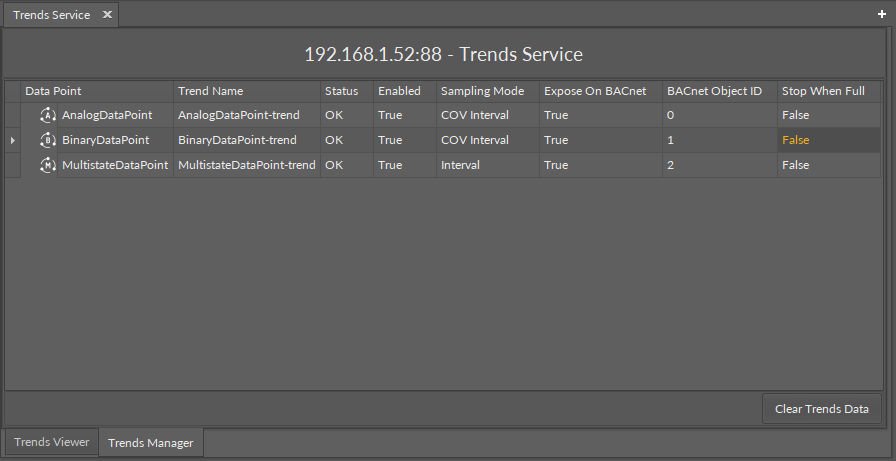
The view allows to see all relevant information about the trend extensions and to clear trends data.
The Trends Manager has the following columns:
-
Data Point: shows the name of the Data Point that contains the trend extension;
-
Trend Name: shows the name of the trend extension;
-
Status: shows the status of the trend extension;
-
Enabled: shows if the trends extension is enabled in the Data Point;
-
Sampling Mode: informs about the way the samples are gathered;
-
Expose On BACnet: informs if the trend extension is automatically exposed on the BACnet network;
-
BACnet Object ID: shows the assigned BACnet ID, if exposed;
-
Stop When Full: informs if the stop-when-full setting is enabled in the extension.
Please note that all the above data is available and (some) editable in the trends extension’s slots in the relevant Data Point.
The Trends Manager offers one action:
-
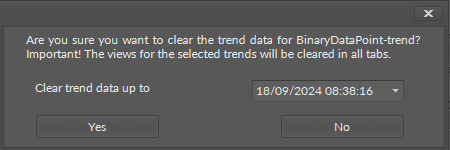
Clear Trends Data: removes all trend samples up to the selected date and time.
The action has to be confirmed in a pop-up window, which also allows to select date and time until which the data will be removed.