
Warning!
This section applies to the Touch Point 2.0, Touch Point ONE 2L/1B 2.0, Touch Point VAV 2.0, and Touch Point Network Sensor 2.0 series. The Touch Point ONE 2.0 and Touch Point L&B 2.0 series are equipped with generic buttons, which operation is dependent upon programming.
The Touch Point 2.0 panels have a feature of setting a temperature setpoint and sending it through communication protocols to any temperature control device. The temperature setpoint value is configurable through the following parameters or in the iSMA Configurator:
EFFECTIVE_SETPOINT: indicates a sum of the temperature actual setpoint value and offset. The register contains a value multiplied by 10;
-
Modbus register: 41502;
-
BACnet object: AI3, property: Present Value;
SETPOINT_VALUE: allows to set an actual temperature setpoint value. After reset, the DEFAULT_SETPOINT register's value is set to the SETPOINT_VALUE register. The register contains a value multiplied by 10. The value range is 0-500 (0-50oC);
-
Modbus register: 41501;
-
BACnet object: AV56, property: Present Value;
DEFAULT_SETPOINT: contains a temperature default setpoint value. The default setpoint is set as a setpoint value after the panel's restart or power supply reconnection (the value of the DEFAULT_SETPOINT register is written to the SETPOINT_VALUE register). The register contains a value multiplied by 10. In the range of 0-500 (0-50oC), the default value is 210 (21oC);
-
Modbus register: 41503;
-
BACnet object: AV57, property: Present Value;
OFFSET_SETPOINT: allows to set an offset value to the temperature setpoint (correction to the setpoint's value). The register contains a value multiplied by 10. The range of the OFFSET_SETPOINT variable is set against the OFFSET_RANGE value: if the OFFSET_RANGE value is set to X, the OFFSET_SETPOINT range is -X to X. The default value is 0 (0oC);
-
Modbus register: 41504;
-
BACnet object: AV58, property: Present Value.
Above parameters are limited to certain values stored in the following parameters:
SETPOINT_LOW_LIMIT: allows to set a minimum temperature setpoint value, which can be set by user. The register contains a value multiplied by 10. The default value is 180 (18oC);
-
Modbus register: 41505;
-
BACnet object: AV56, property: Low Limit;
SETPOINT_HIGH_LIMIT: allows to set a maximum temperature setpoint value, which can be set by user. The register contains a value multiplied by 10. The default value is 240 (24oC);
-
Modbus register: 41506;
-
BACnet object: AV56, property: High Limit;
OFFSET_RANGE: allows to set a limit for temperature offset value. The register contains a value multiplied by 10. In the range of 0-100 (0-10oC), the default value is 30 (3oC);
-
Modbus register: 41507;
-
BACnet object: AV59, property: Present Value.
User Interface Parameters for Temperature Setpoint
In Touch Point 2.0 panels, the temperature setpoint can also be configured using a touch panel (see User Interface Guide). This way, it is possible to change either the SETPOINT_VALUE or OFFSET_SETPOINT depending on the configuration of bits 1 and 2 of the SETPOINT_CONFIGURATION and the SETPOINT_STEP and EXIT_EDIT_TIME parameters:
SETPOINT_CONFIGURATION, bit 1: EDITABLE: enables or disables editing of the temperature setpoint locally from the panel;
-
Modbus register: 41513;
-
BACnet object: AV56, property: 4200;
SETPOINT_CONFIGURATION, bit 2: OPERATING_MODE: allows to set the operating mode of the temperature setpoint configuration;
-
Modbus register: 41513;
-
BACnet object: BO55, property: Out Of Service;
|
Bit |
Name |
0 |
1 |
|---|---|---|---|
|
1 |
Editable |
Not editable |
Editable (default) |
|
2 |
Operating mode |
Changing offset |
Changing setpoint (default) |
For description of all bits of the SETPOINT_CONFIGURATION parameter see User Interface Guide.
SETPOINT_STEP: allows to set a temperature's setpoint step value. If the setpoint is changed locally from the panel (using -/+ buttons), a single press of a button causes a setpoint change with the step value stored in this register. The setpoint can be changed in the range determined by setpoint limits stored in the SETPOINT_LOW_LIMIT and SETPOINT_HIGH_LIMIT parameters.
The setpoint's step value is also automatically adjusted to the setpoint display precision. If the bit 4 of the SETPOINT_CONFIGURATION register is true, the setpoint value is displayed with one decimal place. In such a case, the setpoint's step value is also adjusted to one decimal place. The register contains a value multiplied by 10. The default value is 10 (1oC);
-
Modbus register: 41508;
-
BACnet object: AV56, property: 1507;
EXIT_EDIT_TIME: allows to set the time after which edition of any editable parameter is finished. The parameter is set in seconds. The default value is set to 5 seconds;
-
Modbus register: 40224;
-
BACnet object: AO17, property: Present Value.
How to change the temperature setpoint on the touch panel?
-
Short press + or - button to enter an edit mode (display should start blinking with a current value);
-
Change the temperature setpoint value by steps set in the SETPOINT_STEP:
-
- button decreases the value (multiple times for long press);
-
+ button increases the value (multiple times for long press).
-
-
Reaching a limit value will be signaled with a double beep.
-
Device will automatically exit the edit mode after the time set in the EXIT_EDIT_TIME expires from a last interaction.
LED Bar
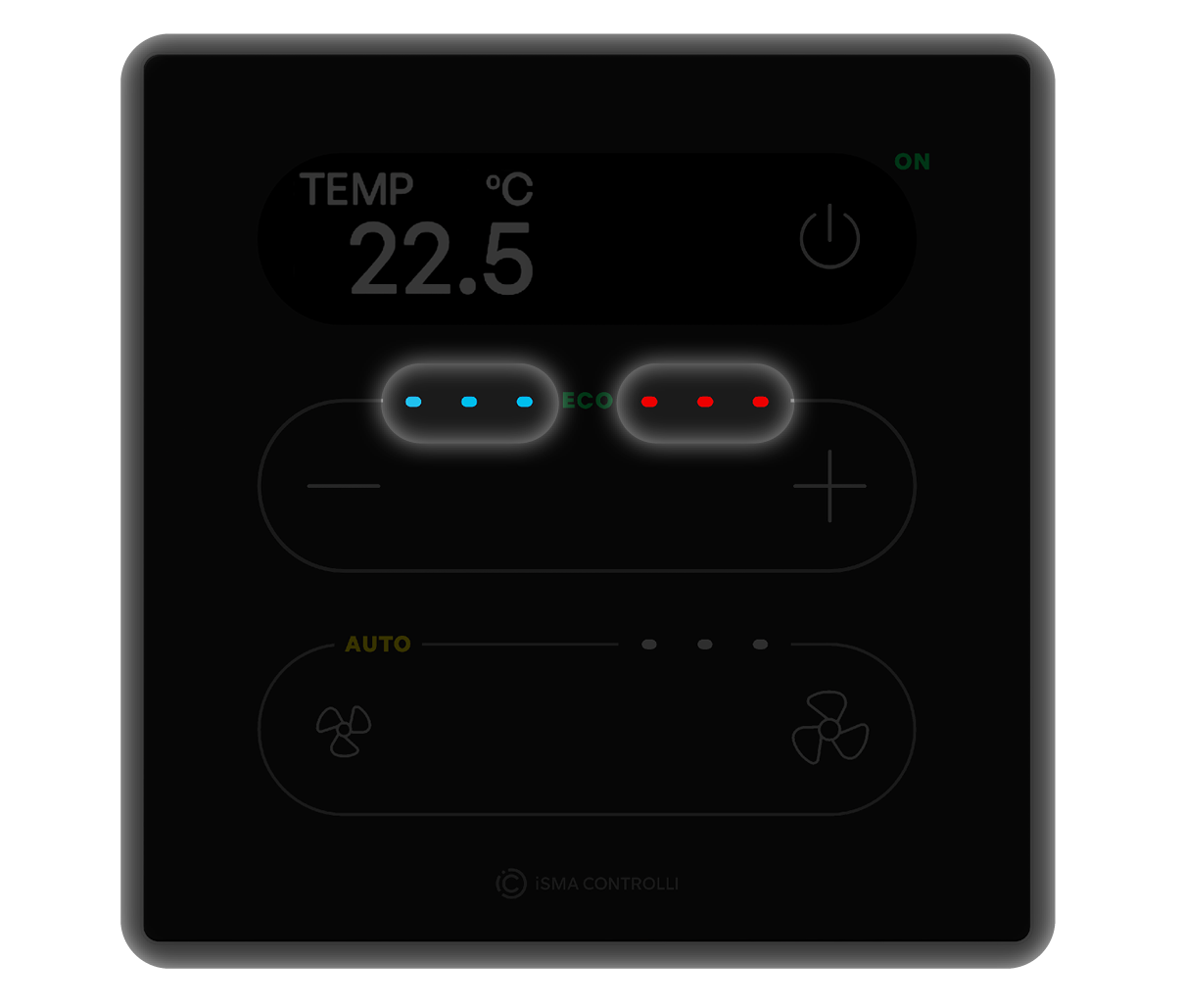
The Touch Point 2.0 LED bar is comprised of three blue diodes and three red diodes. For every 0.5°C change of a selected value (depending on the LED bar mode), LED bar brightness changes by 50% of single LED point. Number and brightness of LEDs indicate exact difference of the values:
-
every 0.5 degree of difference lights up a next LED half way up;
-
every 1 degree of difference lights up a next LED to maximum;
-
a difference greater than 3 degrees lights up all 3 LEDs and does not change further;
-
changes are controlled with 0.2 degrees hysteresis to prevent LEDs flashing.
The value, which change will be illustrated on the LED bar display, is defined in the SETPOINT_LED_BAR_MODE and SETPOINT_LED_BAR_USER_VALUE variables.
SETPOINT_LED_BAR_MODE: allows to select a LED bar operation mode:
|
Value |
LED mode |
Description |
|---|---|---|
|
1 |
Disabled |
LED bar illumination is disabled |
|
2 |
Show setpoint |
LED bar shows a difference between an effective setpoint and default setpoint. There is no differential value hysteresis between changing LED brightness stages. |
|
3 |
Regulation error |
LED bar shows a difference between an effective temperature and effective setpoint. Differential value hysteresis between changing LED brightness stages is 0.2°C. |
|
4 |
BMS |
LED bar shows a value set in the SETPOINT_LED_BAR_USER_VALUE parameter. There is no differential value hysteresis between changing LED brightness stages. |
-
Modbus register: 41509;
-
BACnet object: MSV32, property: Present Value.
SETPOINT_LED_BAR_USER_VALUE: allows to set a value represented on the LED bar (in the range -500 to 500) if the LED bar mode is set to BMS. The register contains a value multiplied by 10;
-
Modbus register: 41510;
-
BACnet object: AV67, property: Present Value.