
Warning!
This section applies to the Touch Point 2.0, Touch Point ONE 2L/1B 2.0, and - conditionally - Touch Point VAV 2.0 series. Fan control is not supported in the Touch Point VAV 2.0 series by default, however, it can be activated using Modbus registers/BACnet objects. Please note that the Touch Point VAV series is not equipped with fan control buttons on the front panel.
The Touch Point Network Sensor 2.0 series does not support fan control. The Touch Point ONE 2.0 and Touch Point L&B 2.0 series are equipped with generic buttons, which operation is dependent upon programming.
The fan control feature allows a user to control ventilation devices through the following parameters or in the iSMA Configurator:
FAN_MODE: allows to select a fan mode. There are up to 5 different fan modes, which can be selected locally from the panel.
|
Modbus value |
BACnet value |
Fan mode |
|---|---|---|
|
0 |
1 |
Off (default) |
|
1 |
2 |
Manual, speed 1 |
|
2 |
3 |
Manual, speed 2 |
|
3 |
4 |
Manual, speed 3 |
|
4 |
5 |
Auto |
-
Modbus register: 41602;
-
BACnet object: MSV1, property: Present Value;
FAN_CURRENT_SPEED: allows to set the fan operating speed and mode according to the table below:
|
Modbus value |
BACnet value |
Fan mode |
Description |
|---|---|---|---|
|
0 |
1 |
Off (default) |
Fan is off |
|
1 |
2 |
Manual speed 1 |
Fan works in speed 1, manual mode |
|
2 |
3 |
Manual speed 2 |
Fan works in speed 2, manual mode |
|
3 |
4 |
Manual speed 3 |
Fan works in speed 3, manual mode |
|
4 |
5 |
Auto speed 1 |
Fan works in speed 1, auto mode |
|
5 |
6 |
Auto speed 2 |
Fan works in speed 2, auto mode |
|
6 |
7 |
Auto speed 3 |
Fan works in speed 3, auto mode |
-
Modbus register: 41601;
-
BACnet object: MSV0, property: Present Value.
This value can be updated in two ways depending on the FAN_CONFIG_LOCAL_MODE parameter:
FAN_CONFIGURATION, bit 6: FAN_CONFIG_LOCAL_MODE: allows to set the fan to work either in the local mode or BMS mode:
Local Mode: the panel's fan setting works in a local mode (the value of the FAN_CURRENT_SPEED register is determined by the value of the FAN_MODE register and so the value of the FAN_CURRENT_SPEED register cannot be overwritten by the higher level system);
BMS Mode: the panel's fan setting works in the BMS mode. The FAN_MODE register works separately from the FAN_CURRENT_STATUS register.
The default value is the BMS mode.
-
Modbus register: 41614;
-
BACnet object: BO60, property: Present Value.
User Interface Parameters for Fan Control
Warning!
This section applies to the Touch Point 2.0 and Touch Point ONE 2L/1B 2.0 series.
The Touch Point VAV 2.0 series is not equipped with fan control buttons. The Touch Point Network Sensor 2.0 series does not support fan control. The Touch Point ONE 2.0 and Touch Point L&B 2.0 series are equipped with generic buttons, which operation is dependent upon programming.
Fan control can also be performed using the touch panel (see User Interface Guide). It is possible to change the fan mode depending on the configurations:
FAN_CONFIGURATION, bit 1: EDITABLE: enables or disables the fan to be edited locally from the panel;
-
Modbus register: 41614;
-
BACnet object: MSV1, property: 4200;
FAN_CONFIGURATION, bit 2: FAN_PART_EDITABLE: allows to set the fan to be fully editable (all modes stored in the FAN_MODE register available) or partly editable (selection between the auto mode and off);
-
Modbus register: 41614;
-
BACnet object: BO58, property: Present Value.
FAN_TYPE: allows to select a fan type. The fan type selection determines, which fan modes are available in the FAN_MODE register.
|
Modbus value |
BACnet value |
Fan type |
|---|---|---|
|
0 |
1 |
0-10 V |
|
1 |
2 |
1-speed fan |
|
2 |
3 |
2-speed fan |
|
3 |
4 |
3-speed fan |
|
4 |
5 |
1-speed, no auto mode |
|
5 |
6 |
2-speed, no auto mode |
|
6 |
7 |
3-speed, no auto mode |
-
Modbus register: 41603;
-
BACnet object: MSV2, property: Present Value.
How to change the fan mode on the touch panel?
-
Use a small fan button to decrease the value by one.
-
Use a big fan button to increase the value by one.
-
Reached limit is signalized by a double beep.
-
A long press is not available for this feature.
LED Bar
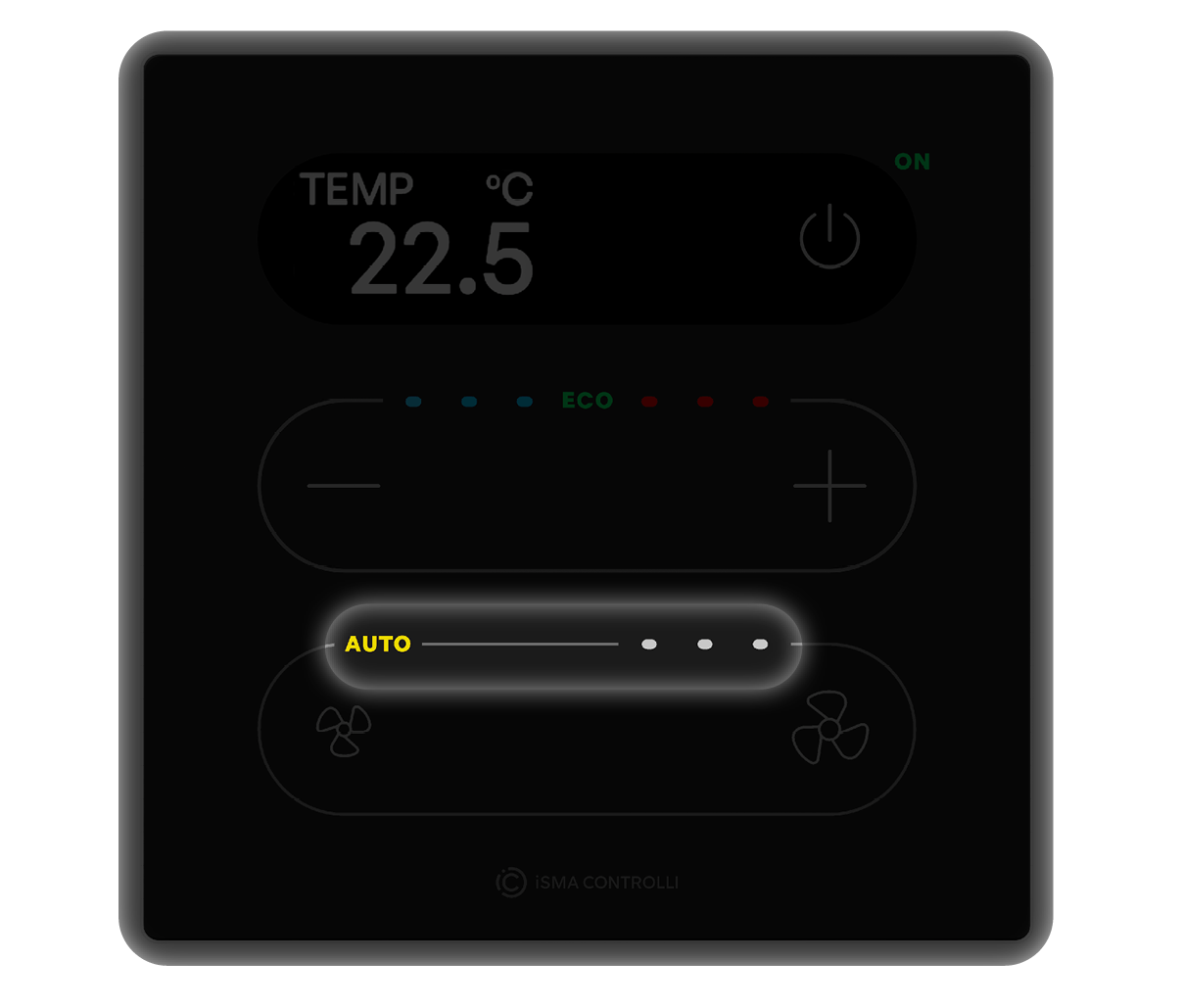
Value of the FAN_CURRENT_SPEED parameter is presented on a LED bar as follows:
-
fan speeds from 1 to 3 lights up a single led for each level (same for manual and auto);
-
auto settings light up an Auto LED.