
Applicable to OS V1.10
The DT8_CCT component is designed to manage DALI DT8 (Color Control) devices, enabling configuration and monitoring of operating parameters and scenes. The DT8_CCT component allows to define and store up to 16 scenes of light intensity and color temperature for CCT channel levels, depending on the device type and groups assignment. It also allows to set standard DALI parameters such as lighting level limits, lighting levels on power up and for system failure, assigning to groups, etc. This provides a centralized control over how fixtures behave when scenes are recalled, on a power‑up, during system failures, and in group operations.
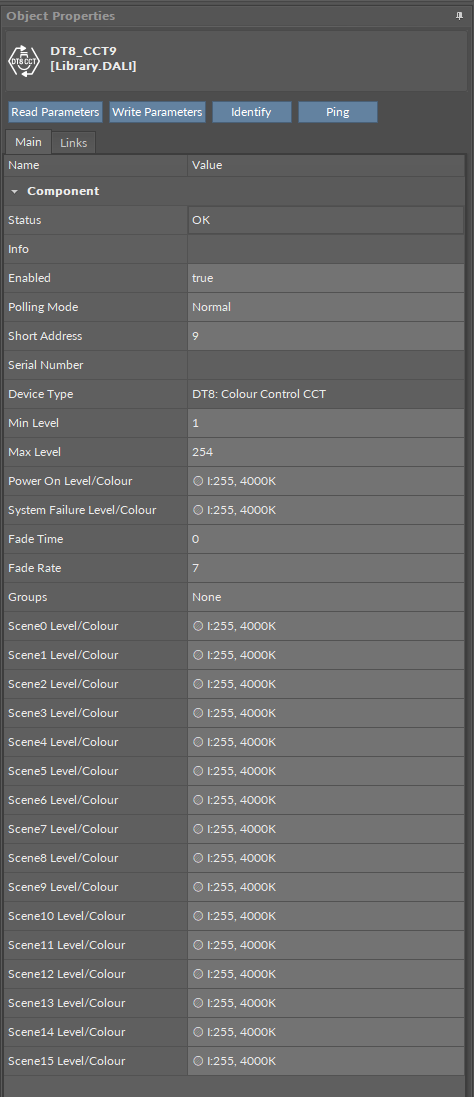
The DT8_CCT component has the following slots:
-
Status: indicates the current status of the component; if the component works properly, its status is OK. The component becomes Disabled, once the Enabled slot is in false. The component's status is Fault, once the component is not located under the Network component. If there is no response from the addressed device, the component goes into the Down status,
-
Available information: Disabled, Fault, Down, OK;
-
-
Info: provides a detailed information about the Disabled and Fault statuses of the component;
-
Available information:
-
Incorrect placement - must be placed under Network (status Fault): occurs, when the component is placed in a different location than under the Network component;
-
Incorrect configuration (status Fault): the short address is not defined;
-
Device disabled (status Disabled): the Enabled slot in the device is set to false;
-
Network disabled (status Disabled): the Enabled slot in the network is set to false;
-
-
The Info is a numerical slot, which displays a correlated text information:
|
Numerical value |
Displayed information |
|---|---|
|
0 |
No information displayed in the Info slot |
|
1 |
Incorrect placement - must be placed under Network |
|
2 |
Incorrect configuration |
|
3 |
Device disabled |
|
4 |
Network disabled |
-
Enabled: change of the slot's value enables or disables the component,
-
Available settings: true (enabled), false (disabled),
-
Note: If the Enabled slot is in false (meaning the component is disabled), the Status slot becomes Disabled.
-
Polling Mode: allows to set the frequency of sending polling requests for the point's value to remote devices—the polling mode is automatically set to normal,
-
Available settings: fast, normal, slow;
-
-
Short Address: allows to enter a DALI short address of the controlled device,
Note: Short address in this slot is not written to the device itself, only in the application controller’s logic. The communication with the remote device will be sustained if the DALI short address in the DT8_CCT component is identical to the remote device’s. If these values differ, the DT8_CCT component will go into the Down status.
-
Serial Number: shows a serial number of a controlled device,
-
Device Type: shows which type is a controlled device,
-
Available information: DT8: Colour Control;
-
-
Min Level: allows to set a minimum output lighting level value,
-
Max Level: allows to set a maximum output lighting level value,
-
Power On Level/Colour: allows to set a lighting level and color value on a device’s power up,
-
System Failure Level/Colour: allows to set a lighting level and color value for a case of system failure (for example, a power loss),
-
Fade Time: allows to set a time for a lighting to increase/dim to a target level by a value from 0 to 15 representing times from instant change to 90.5 seconds:
|
4-bit value |
Fade time (sec) |
|---|---|
|
0 (default) |
Instant |
|
1 |
0.7 s |
|
2 |
1.0 s |
|
3 |
1.4 s |
|
4 |
2.0 s |
|
5 |
2.8 s |
|
6 |
4.0 s |
|
7 |
5.7 s |
|
8 |
8.0 s |
|
9 |
11.3 s |
|
10 |
16.0 s |
|
11 |
22.6 s |
|
12 |
32.0 s |
|
13 |
45.3 s |
|
14 |
64.0 s |
|
15 |
90.5 s |
-
Fade Rate: allows to set a speed rate a device can reach for a light to increase/dim to a target level by a value from 0 to 15 representing speed in steps per second from the fastest change to the slowest:
|
Value |
Fade rate (approx. steps/sec) |
|---|---|
|
1 |
358 steps/s (fastest) |
|
2 |
253 steps/s |
|
3 |
179 steps/s |
|
4 |
127 steps/s |
|
5 |
89.4 steps/s |
|
6 |
63.3 steps/s |
|
7 (default) |
44.7 steps/s |
|
8 |
31.6 steps/s |
|
9 |
22.4 steps/s |
|
10 |
15.8 steps/s |
|
11 |
11.2 steps/s |
|
12 |
7.9 steps/s |
|
13 |
5.6 steps/s |
|
14 |
4.0 steps/s |
|
15 |
2.8 steps/s (slowest) |
-
Groups: allows to assign a device to a specific group (or groups), which can represent a location, type of device, role, etc.,
-
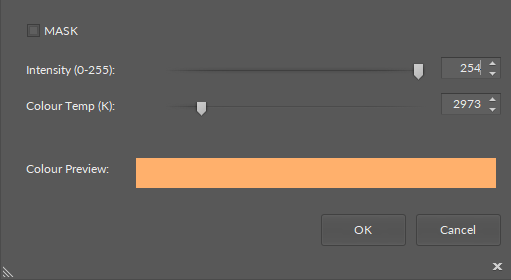
Scene0-15 Level/Colour: allow to set different lighting intensity and controlled color temperature (CCT) levels, which can reflect various lighting scenarios and be recalled instantly with a DALI command,
-
Available settings:
-
light intensity: 0-255, where 0-254 represent actual lighting levels and a 255 value means that when a specific scene is recalled, a device should not change its lighting level (MASK value),
-
controlled color temperature: 2500-6500 (K).
-
-
-
To start editing the lighting intensity and controlled color temperature values, uncheck the MASK checkbox.
-
Checking the MASK checkbox resets the light intensity value to 255 and it does not affect the color temperature value, however, disables editing of both parameters.
-
The color preview bar presents a visual preview of perceived light color for the set CCT value. It is a UI-only visualization; actual output depends on the luminaire’s capabilities and spectrum.
-
Confirming the set values in the Scene0-15 Level/Colour editing window with OK sends the appropriate DALI commands to selected addresses (single devices, groups, or broadcast), respecting the “MASK” behavior.
The DT8_CCT component has the following actions:
-
Read Parameters: reads all relevant parameters from a remote device and updates relevant slots,
-
Write Parameters: writes current parameter values to a remote device (lighting levels, fade time and rate values, group(s) assignment, scene levels),
-
Identify: sends the Identify DALI command to a remote device for identification,
-
Ping: sends a request to a remote device and waits for an answer (if there is no response from the requested device, the DT8_CCT component goes into the Down status).
ActionTrigger Extension
The ActionTrigger extension is designed to invoke any action that is available for the component. The extension triggers an action selected in the Action Name on the rising edge of the Action Trigger slot. If the action has parameters to set, the parameter is taken from a relevant slot automatically added to the extension (Analog Value/Binary Value/String Value).
It is possible to add more than one ActionTrigger extension to the component (for example, one for each action in the component).
The extension is added from the context menu of the component.
The ActionTrigger extension has the following slots:
-
Action Name: allows to select an action to invoke;
-
Action Trigger: triggers an action selected in the Action Name slot;
-
Action Analog Value/Action Binary Value/Action String Value: a slot added automatically to the extension if an action selected in the Action Name slot has any specific parameters to set (depending on the type of action and its parameters, the relevant type of value is matched).