
The CGStatus component is a network point class component, which uses the DALI QueryStatus command to retrieve the current status of a control gear (e.g., LED driver or ballast). The returned value is an 8-bit status byte where each bit represents a specific condition or state of the device.
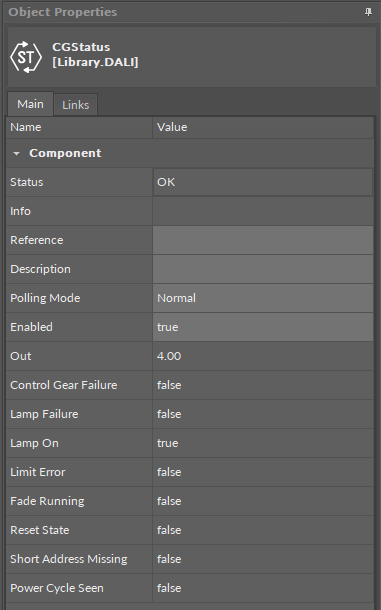
The CGStatus component has the following slots:
-
Status: indicates the current status of the component; if the component works properly, its status is OK. The component becomes Disabled, once the Enabled slot is in false. The component's status is Fault, once the component is not located under the ControlGear device. If there is no response from the device addressed in the ControlGear component, the component goes into the Down status,
-
Available information: Disabled, Fault, Down, OK;
-
-
Info: provides a detailed information about non-OK statuses of the component;
-
Available information:
-
Bad request (status Down): occurs when point could not be polled successfully, most likely because its parameters are incorrect (e.g., a short address set in the ControlGear component is unavailable);
-
Request timed out (status Down): occurs when the point cannot be polled for some time;
-
Waiting for network reconfiguration… (status Down): caused by disabling/enabling the point, changing its parameters, or by changes in networks – in this case the Down status is only temporary and should switch back to OK in a couple of seconds;
-
Incorrect placement - must be placed under Device (status Fault): occurs if the point is placed in a different location than under Device in a DALI network; for example, when the network point class component is placed in the Applications container instead of the Networks;
-
Incorrect placement - must be placed under compatible communication protocol (status Fault): occurs if the point is placed under network different than DALI;
-
Incorrect configuration (status Fault): the short address is not defined;
-
Device disabled (status Disabled): the Enabled slot in the host ControlGear component is set to false;
-
Point disabled (status Disabled): the Enabled slot in the component is set to false;
-
-
The Info is a numerical slot, which displays a correlated text information:
|
Numerical value |
Displayed information |
|---|---|
|
0 |
No information displayed in the Info slot |
|
1 |
Bad request |
|
2 |
Request timed out |
|
3 |
Waiting for network reconfiguration |
|
4 |
Incorrect placement - must be placed under Device |
|
5 |
Incorrect placement - must be placed under compatible communication protocol |
|
6 |
Incorrect configuration |
|
7 |
Device disabled |
|
8 |
Point disabled |
-
Reference: a special slot allowing to connect network point class components with Data Point class components. It allows to transfer the Out slot value along with the component's status.
Note: Reference links from Data Points to network points also transfer values in the opposite direction, in a link-back-from process: having received a value by the Reference link, the network point transfers it back to the Data Point to whichever input priority from 1 to 16 is set in the network point.
-
Description: an additional detailed information about a component that may be freely described by the user; the description may contain individual coding, defined in the user's system documentation, device's location, or any other information the user finds applicable.
Note: The description is effectively added only if the point allows it–the description is not added internally in the controller for the remote point, but it is sent directly to the point.
-
Input Priority: allows to indicate the input number in the Data Point, which the network point class component's output value is sent to, in case the network point detects the change on its Out slot; none priority is set by default.
-
Available settings: none, 1-16.
-
-
Polling Mode: allows to set the frequency of sending polling requests for the point's value to remote devices—the polling mode is automatically set to normal;
-
Available settings: fast, normal, slow;
-
-
Enabled: change of the slot's value enables or disables the component;
-
Available settings: true (enabled), false (disabled);
-
Note: If the Enabled slot is in false (meaning the component is disabled), the Status slot becomes Disabled;
-
Out: the 8-bit output value containing information about the control gear’s status;
-
Control Gear Failure: indicates if a failure has been detected in the addressed remote device;
-
Lamp Failure: indicates if a lamp failure has been detected;
-
Lamp On: indicates if a lamp is currently switched on;
-
Limit Error: indicates if a light dimming level exceeds assigned limits;
-
Fade Running: indicates if a fading process is ongoing;
-
Reset State: indicates if the device is resetting;
-
Short Address Missing: indicates if the remote device is missing a short address;
-
Power Cycle Seen: indicates if the remote device has temporarily lost power supply.