
Applicable to OS V1.10
The CCTSendCommand component is designed to send out DALI-2 commands to control gear DT8 (Device Type 8) CCT (Correlated Color Temperature) lighting devices on a DALI-2 network. The component allows users to send tunable white lighting commands to DALI-2-compatible LED drivers that support color temperature adjustment. The CCTSendCommand component has a triggering mechanism which issues a specific command of a specific value (both defined in dedicated slots) to a single device, group of devices, or broadcast to all devices.
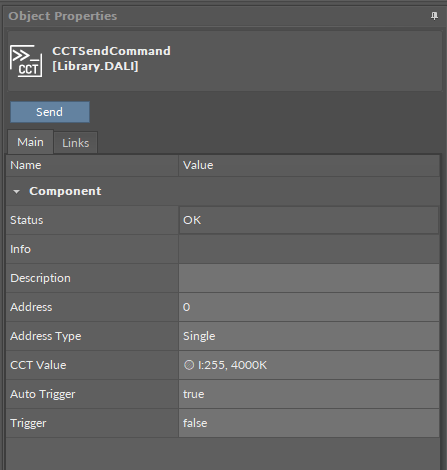
The CCTSendCommand component has the following slots:
-
Status: indicates the current status of the component. If the component works properly, its status is OK; the component's status becomes Disabled if the host Commands' component is disabled;
-
Available information: Disabled, Down, Fault, Bad request, OK.
-
-
Info: provides a detailed information about non-OK statuses of the component;
-
Available information:
-
Bad request (status Down): occurs when point could not be polled successfully;
-
Request timed out (status Down): occurs when the point cannot be polled for some time;
-
Waiting for network reconfiguration… (status Down): caused by changes in networks – in this case the Down status is only temporary and should switch back to OK in a couple of seconds;
-
Incorrect placement - must be placed under Device (status Fault): occurs if the point is placed in a different location than under Commands in a DALI network; for example, when the network point class component is placed in the Applications container instead of the Networks;
-
Incorrect placement - must be placed under compatible communication protocol (status Fault): occurs if the point is placed under network different than DALI;
-
Incorrect configuration (status Fault): the short address is not defined;
-
Device disabled (status Disabled): the Enabled slot in the Network or DALI components is set to false;
-
-
The Info is a numerical slot, which displays a correlated text information:
|
Numerical value |
Displayed information |
|---|---|
|
0 |
No information displayed in the Info slot |
|
1 |
Bad request |
|
2 |
Request timed out |
|
3 |
Waiting for network reconfiguration |
|
4 |
Incorrect placement - must be placed under Device |
|
5 |
Incorrect placement - must be placed under compatible communication protocol |
|
6 |
Incorrect configuration |
|
7 |
Device disabled |
-
Description: an additional detailed information about a component that may be freely described by the user; the description may contain individual coding, defined in the user's system documentation, target device(s') location, or any other information the user finds applicable;
-
Address: allows to set an address of the device(s) to distribute the command to;
Note: The Address slot value is dependent on the Address Type slot. If the Address Type slot is set to Single, the Address is a short DALI address of the device. If the Address Type slot is set to Group, the Address is a group number. If the Address Type is set to All, the Address slot is not used as the command is broadcast to all devices.
-
Address Type: allows to select the target device(s) to send out the command;
-
Available settings: Single, Group, All;
-
-
CCT Value: allows to set values of lighting intensity and color temperature to send out by command;
-
Auto Trigger: allows to enable an auto-trigger mechanism—if set to true, a command is sent on any update to the CCT Value slot;
-
Trigger: allow to send out a command—if set to true, instantly sends out a command.
Note: If the Auto Trigger slot is set to true, the standard triggering mechanism still operates (on the rising edge of the Trigger slot), and the Auto Trigger mechanism additionally sends out commands on any update of the CCT Value slot.
ActionTrigger Extension
The ActionTrigger extension is designed to invoke any action that is available for the component. The extension triggers an action selected in the Action Name on the rising edge of the Action Trigger slot. If the action has parameters to set, the parameter is taken from a relevant slot automatically added to the extension (Analog Value/Binary Value/String Value).
It is possible to add more than one ActionTrigger extension to the component (for example, one for each action in the component).
The extension is added from the context menu of the component.
The ActionTrigger extension has the following slots:
-
Action Name: allows to select an action to invoke;
-
Action Trigger: triggers an action selected in the Action Name slot;
-
Action Analog Value/Action Binary Value/Action String Value: a slot added automatically to the extension if an action selected in the Action Name slot has any specific parameters to set (depending on the type of action and its parameters, the relevant type of value is matched).