
Applicable to OS V1.10
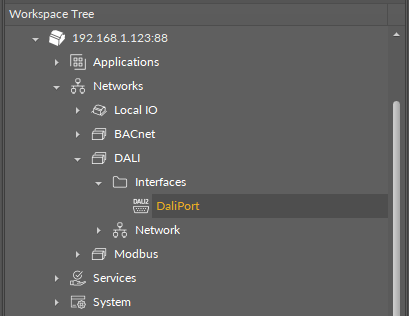
The DALIPort component allows to configure communication with the DALI extension over the RS485 port. It provides a dedicated and hidden channel for data exchange between the controller and the DALI extension module.
Note
Only one network using the DALI communication configured with the DALIPort component can work at a time.
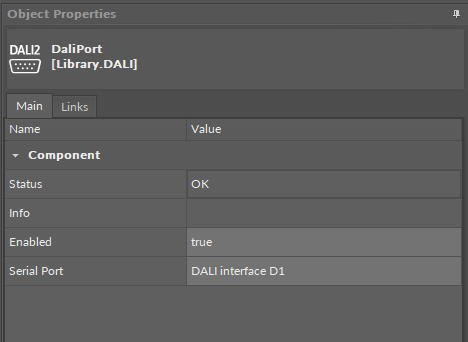
The DALIPort component has the following slots:
-
Status: indicates the current status of the component. If the component works properly, its status is OK; the component's status becomes Disabled if its Enabled slot has been set to false.
-
Available information: Disabled, Fault, Down, OK.
-
-
Info: provides a detailed information about non-OK statuses of the component;
-
Available information:
-
Incorrect placement - must be placed under Interfaces container (status Fault): occurs if the component is added anywhere outside the Interfaces folder under DALI;
-
Incorrect configuration (status Fault): occurs when a parameter is missing or wrongly configured (e.g., port number is wrong);
-
Could not reserve port - already in use (status Fault): occurs if the component’s configuration duplicates parameters of a port which is already in use;
-
Port disabled (status Disabled): the Enabled slot in the component is set to false;
-
Network protocol disabled (status Disabled): the Enabled slot in DALI component is set to false;
-
There is a problem with the network protocol (status Disabled): the DALI component is in a status other than OK or Disabled;
-
The Info is a numerical slot, which displays a correlated text information:
-
|
Numerical value |
Displayed information |
|---|---|
|
0 |
No information displayed in the Info slot |
|
1 |
Incorrect placement |
|
2 |
Incorrect configuration |
|
3 |
Could not reserve port |
|
4 |
Port disabled |
|
5 |
Network protocol disabled |
|
6 |
There is a problem with the network protocol |
-
Enabled: change of the slot's value enables or disables the component;
-
Available settings: true (enabled), false (disabled).
-
Note: If the Enabled slot is in false (meaning the component is disabled), the Status slot becomes Disabled.
Note: By default, the component is enabled.
Warning
If the DALIPort component is disabled, the network configured to operate on the DALI port defined in this component is also disabled.
-
Serial Port: allows to select a serial port for DALI communication.