
Note
Please note that if the switch 1 on the S3 DIP switch is on, than configuration of reheater and perimeter type from any other source is blocked (Control Point VAV), as well as any changes made to the referring parameters (for example, Heater Priority) will not be written to the device.
Warning!
Before using the Control Point VAV panel with the VAV14-IP controller, make sure to upgrade its firmware to version V2.5.
Instructions how to upgrade firmware: iSMA Configurator.
The configuration of the VAV14-IP device is possible directly from the Control Point VAV panel. To do that, it is required to connect the panel to the controller with an RJ45-RJ45 cable.
Parameters available to configure are contained in the panel’s submenu. In order to enter the submenu:
-
long-press the OK button;
-
edit PIN (default: 0000);
-
short-press the OK button.
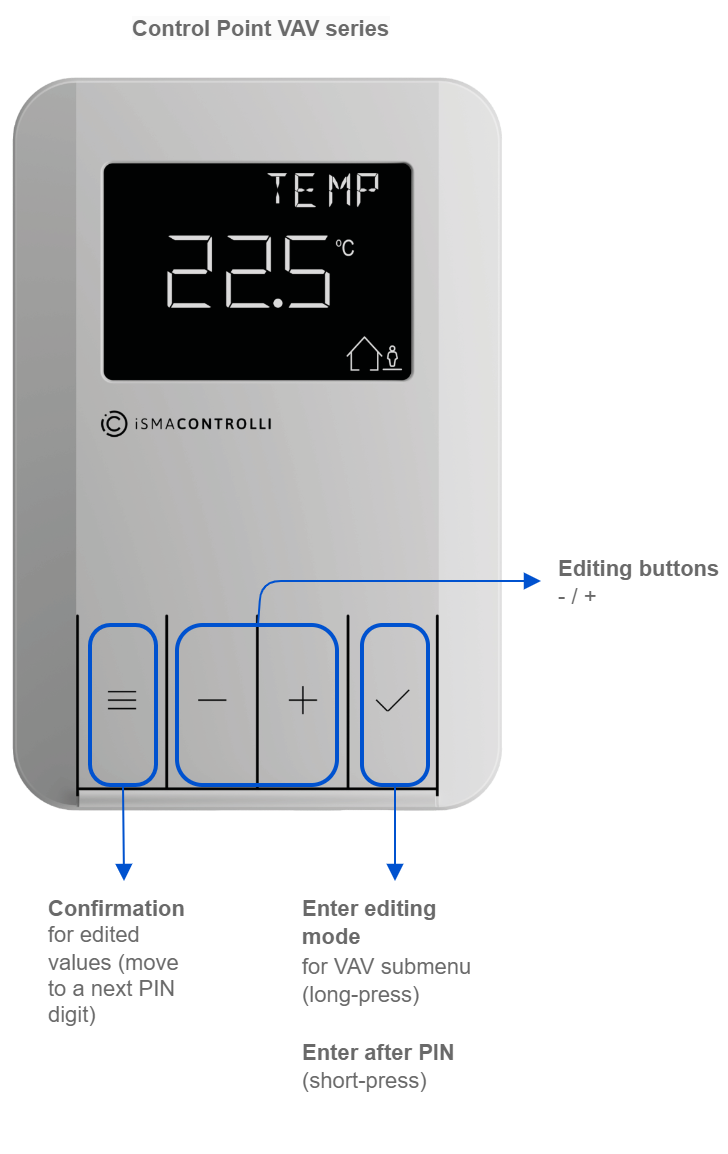
VAV Submenu
In the Control Point panel’s VAV submenu, it is possible to configure parameters of the VAV controller.
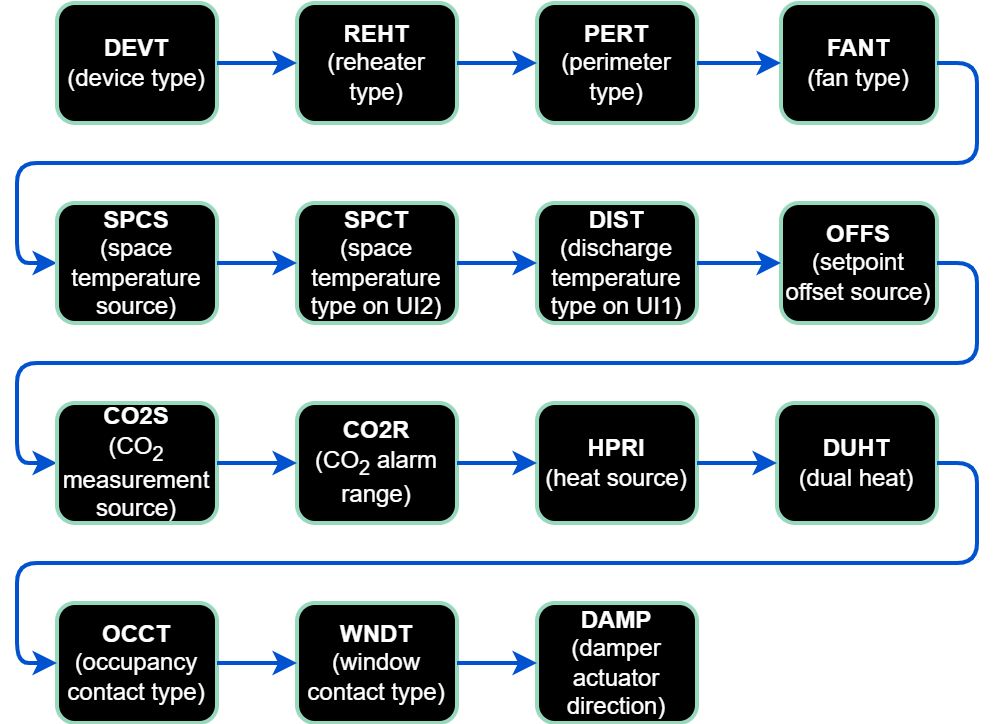
App Configuration
In the Control Point panel’s VAV submenu dedicated to the VAV application, it is possible to configure the following parameters:
DEVT: unused;
REHT: allows to set a reheater type;
-
ReheaterType:
-
Modbus register: 40273;
-
BACnet object: MSV12, property: Present Value;
-
|
Register/object value |
Value |
|---|---|
|
1 |
None |
|
2 |
Time proportional (PWM) |
|
3 |
Staged |
|
4 |
Float |
PERT: allows to set a perimeter type – not in use due to blocking Float mode;
-
PerimeterType:
-
Modbus register: 40274;
-
BACnet object: MSV13, property: Present Value;
-
|
Register/object value |
Value |
|---|---|
|
1 |
None |
|
2 |
Time proportional (PWM) |
|
3 |
Digital |
|
4 |
Float – not allow |
FANT: unused;
SPCS: allows to set a source for temperature readings;
-
TemperatureInputSelector:
-
Modbus register: 40284;
-
BACnet object: MSV23, property: Present Value;
-
|
Register/object value |
Value |
|---|---|
|
1 |
Panel |
|
2 |
Input |
|
3 |
Network |
SPCT: allows to set a space temperature type on the universal input 2;
-
U2SpaceTempType:
-
Modbus register: 40283;
-
BACnet object: MSV22, property: Present Value;
-
DIST: allows to set a discharge temperature type on the universal input 1;
-
U1DischargeTempType:
-
Modbus register: 40282;
-
BACnet object: MSV21, property: Present Value;
-
|
Register/object value |
Value |
|---|---|
|
1 |
Voltage measurement |
|
2 |
Current |
|
3 |
Resistance input |
|
4 |
10K3A1 NTC |
|
5 |
10K4A1 NTC |
|
6 |
10K NTC Carel |
|
7 |
20K6A1 NTC |
|
8 |
2,2K3A1 NTC |
|
9 |
3K3A1 NTC |
|
10 |
30K6A1 NTC |
|
11 |
SIE1 |
|
12 |
TAC1 |
|
13 |
SAT1 |
|
14 |
PT1000 |
|
15 |
NI1000 |
|
16 |
NI1000 21C |
|
17 |
NI1000 LG F |
|
18 |
10K Type2 NTC F |
|
19 |
10K Type3 NTC F |
|
20 |
20K NTC F |
|
21 |
3K NTC F |
|
22 |
PT1000 F |
|
23 |
NI1000 32F |
|
24 |
NI1000 70F |
OFFS: allows to set a source for setpoint offset settings;
-
SetpointOffsetSelector:
-
Modbus register: 40285;
-
BACnet object: MSV24, property: Present Value;
-
CO2S (PRES): allows to set a source for pressure readings;
-
PressureInputSelector:
-
Modbus register: 40286;
-
BACnet object: MSV25, property: Present Value;
-
|
Register/object value |
Value |
|---|---|
|
1 |
Panel – not in use |
|
2 |
Input |
|
3 |
Network |
CO2R (PRER): allows to set a relative range for pressure sensor readings;
-
PressureSensorRange:
-
Modbus register: 40239;
-
BACnet object: AV38, property: Present Value;
-
|
Register/object value |
Value |
|---|---|
|
Min. |
0 |
|
Max. |
1000 |
HPRI: allows to select a priority order for the heat source;
-
HeaterPriority:
-
Modbus register: 40275;
-
BACnet object: MSV14, property: Present Value;
-
|
Register/object value |
Value |
|---|---|
|
1 |
Reheater |
|
2 |
Perimeter |
|
3 |
Simultaneous |
DUHT: allows to enable a possibility to use one or two heat sources;
-
DualHeat:
-
Modbus register: 00109;
-
BACnet object: BV8, property: Present Value;
-
|
Register/object value |
Value |
|---|---|
|
0/false |
No |
|
1/true |
Yes |
OCCT: allows to select an occupancy contact type;
-
PresenceSensorInvert:
-
Modbus register: 00105;
-
BACnet object: BV4, property: Present Value;
-
WNDT: allows to select a window contact type;
-
WindowContactInvert:
-
Modbus register: 00106;
-
BACnet object: BV5, property: Present Value;
-
DAMP: allows to set a damper actuator’s direction to open to clockwise or counterclockwise;
-
DamperDirection:
-
Modbus register: 00110;
-
BACnet object: BV9, property: Present Value.
-
|
Register/object value |
Value |
|---|---|
|
0/false |
Clockwise |
MODE from BAL
DAMP: allows to force an operating mode to a damper;
-
DamperCommand:
-
Modbus register: 40268;
-
BACnet object: MSV7, property: Present Value;
-
|
Damper mode |
Action |
|---|---|
|
AUTO |
Set auto mode (Pressure Control example application logic takes control) |
|
MAXF |
No action |
|
MINF |
No action |
|
USRF |
No action |
|
USRP |
Go to a user-set position (% of damper opening) |
|
OPEN |
Damper fully open |
|
CLOS |
Damper fully closed |
|
CLBR |
Performs a damper calibration (the damper goes to 100%, then to 0%, and goes back to the control loop output) |
-
UserSetPosition: user-set opening level (after selecting the USRP opting in the VAV_DAMPER_COMMAND variable);
-
Modbus register: 40292;
-
BACnet object: AV64, property: Present Value;
-
-
UserSetAirflow: No action;
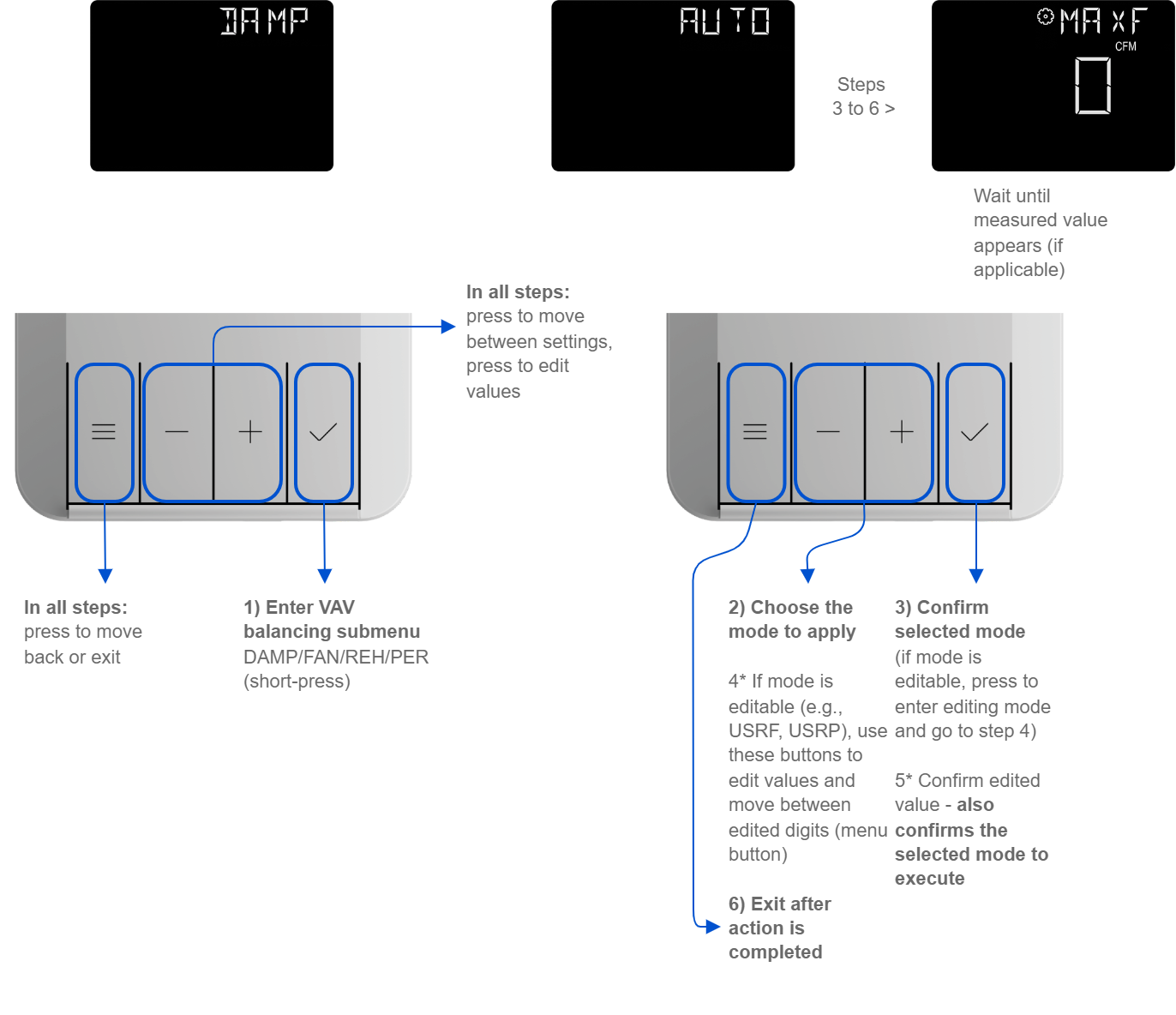
FAN: no action;
REH: allows to force an operating mode to a reheater;
-
ReheaterCommand:
-
Modbus register: 40270;
-
BACnet object: MSV9, property: Present Value;
-
|
Reheater mode |
Action |
|---|---|
|
AUTO |
Set an auto mode (VAV application logic takes control) |
|
OPEN |
Fully open |
|
CLOS |
Fully closed |
PER: allows to force an operating mode to a perimeter;
-
PerimeterCommand:
-
Modbus register: 40271;
-
BACnet object: MSV10, property: Present Value.
-
|
Perimeter mode |
Action |
|---|---|
|
AUTO |
Set an auto mode (VAV application logic takes control) |
|
OPEN |
Fully open |
|
CLOS |
Fully closed |