
Pressure Control Only
The pressure control only example application is a configuration factory default; it does not require any further configuration of the reheater or perimeter. Other configuration parameters (such as damper direction – CW or CCW, default sensor source, type and range or polarity, dual heating function, or heater priority) are available in software programming tools (iSMA Configurator/iC Device Manager module/iC Tool/BACnet/Modbus).
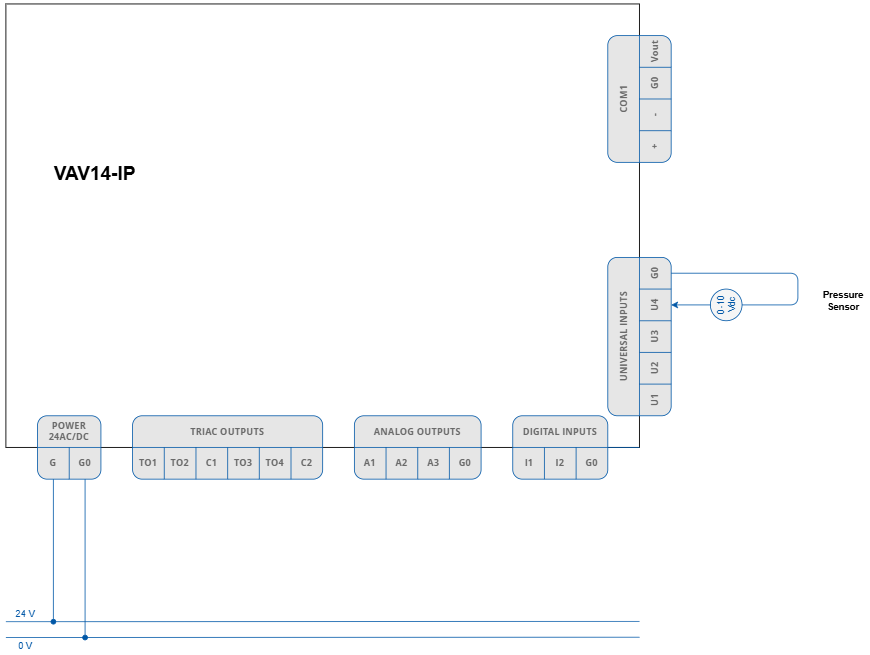
The pressure sensor connected to U4 input are required for the application to operate properly.
Pressure Control with Water Reheater
The pressure control with water reheater application requires to configure the following parameter:
-
reheater’s control type (time proportional - PWM, digital, or floating).
Configuring of any type of the reheater automatically activates an analog control mode, so it does not require any further configuration.
Other configuration parameters (such as damper direction – CW or CCW, default sensor source, type and range or polarity, dual heating function, or heater priority) are available in the Control Point VAV panel or software programming tools (iSMA Configurator/iC Device Manager module/iC Tool/BACnet/Modbus).
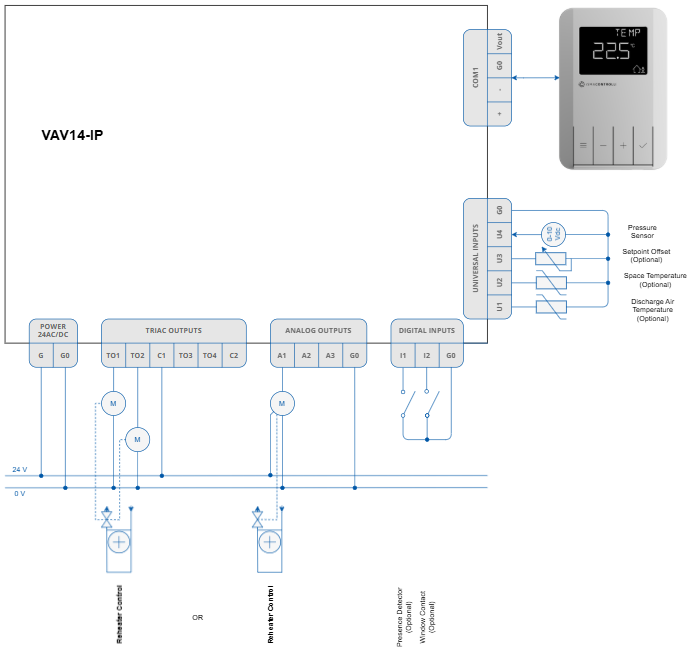
For the application to operate properly, it is required to connect the following elements:
-
pressure sensor connected to U4 input,
-
Control Point VAV panel or sensors on inputs (space temperature, setpoint offset sensor),
-
optionally, DAT sensor located in the supply air duct after reheater.
Optionally, it is possible to connect the presence detector and window contact sensors to minimize energy efficiency loss. To control the reheater dedicated triac and analog output are available, as depicted on the diagram above.
Pressure Control with Electric Reheater
The pressure control with up to 2-stage electric reheater application requires to configure the following parameter:
-
reheater’s control type:
-
1-stage reheater: time proportional (PWM), digital (on/off),
-
2-stage reheater: digital (on/off).
-
Configuring of any type of the reheater automatically activates an analog control mode, so it does not require any further configuration.
Other configuration parameters (such as damper direction – CW or CCW, default sensor source, type and range or polarity, dual heating function, or heater priority) are available in the Control Point VAV panel or software programming tools (iSMA Configurator/iC Device Manager module/iC Tool//BACnet/Modbus).
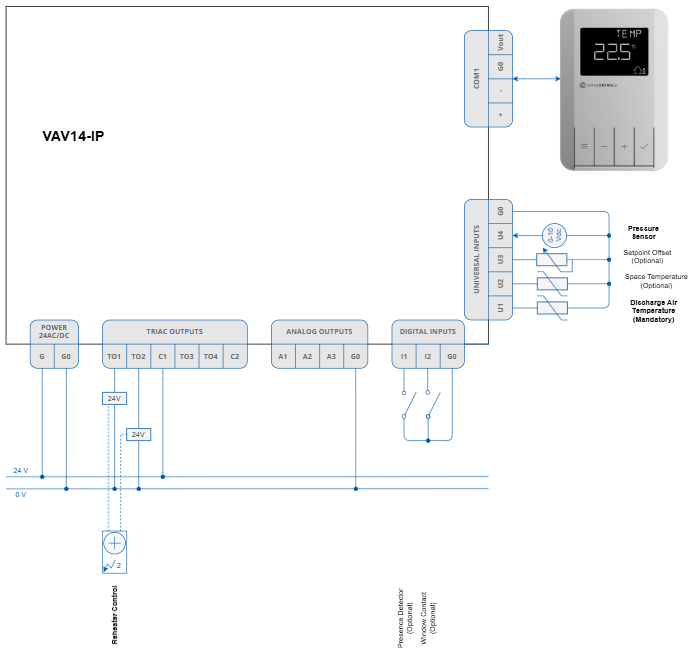
For the application to operate properly, it is required to connect the following elements:
-
pressure sensor connected to U4 input,
-
Control Point VAV panel or sensors on inputs (space temperature, setpoint offset, sensor), and
-
DAT sensor located in the supply air duct after reheater.
Optionally, it is possible to connect the presence detector and window contact sensors to minimize energy efficiency loss. To control the reheater dedicated triac and analog output are available, as depicted on the diagram above.
Pressure Control with Perimeter
The pressure control with perimeter application requires to configure the following parameter:
-
perimeter’s control type (time proportional - PWM, on/off, or floating).
Configuring of any type of the perimeter automatically activates an analog control mode, so it does not require any further configuration.
Other configuration parameters (such as damper direction – CW or CCW, default sensor source, type and range or polarity, dual heating function, or heater priority) are available in the Control Point VAV panel or software programming tools (iSMA Configurator/iC Device Manager module/iC Tool/BACnet/Modbus).
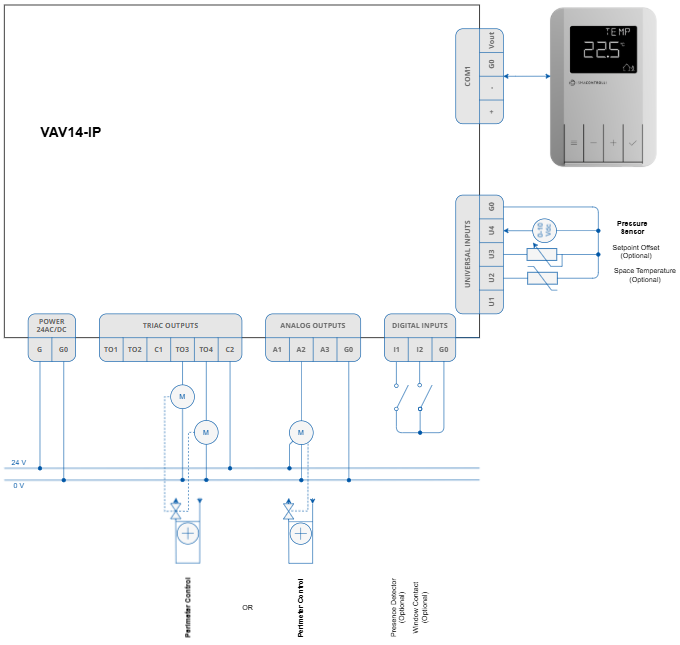
For the application to operate properly, it is required to connect the following elements:
-
pressure sensor connected to U4 input,
-
Control Point VAV panel or sensors on inputs (space temperature, setpoint offset, sensor).
Optionally, it is possible to connect the presence detector and window contact sensors to minimize energy efficiency loss. To control the perimeter, dedicated triac and analog output are available, as depicted on the diagram above.
Pressure Control with Water Reheater and Perimeter
The Pressure Control with water reheater and perimeter application requires to configure the following parameters:
-
reheater’s control type (time proportional - PWM, digital, or floating),
-
perimeter’s control type (time proportional - PWM, on/off, or floating).
Configuring of any type of the reheater or perimeter automatically activates an analog control mode, so it does not require any further configuration.
Other configuration parameters (such as damper direction – CW or CCW, default sensor source, type and range or polarity, dual heating function, or heater priority) are available in the Control Point VAV panel or software programming tools (iSMA Configurator/iC Device Manager module/iC Tool/BACnet/Modbus).
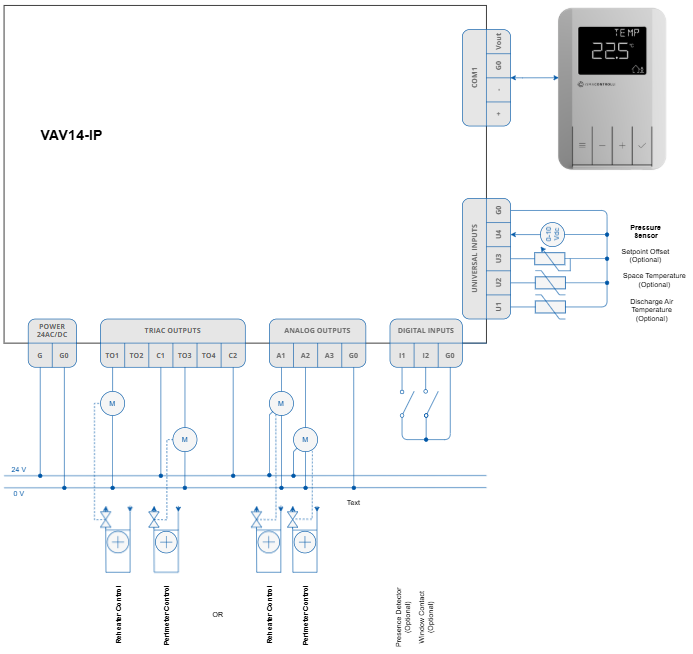
For the application to operate properly, it is required to connect the following elements:
-
pressure sensor connected to U4 input,
-
Control Point VAV panel or sensors on inputs (space temperature, setpoint offset sensor),
-
optionally, DAT sensor located in the supply air duct after reheater.
Optionally, it is possible to connect the presence detector and window contact sensors to minimize energy efficiency loss. To control the reheater and perimeter, dedicated triac and analog output are available, as depicted on the diagram above.
Pressure Control with Electric Reheater and Perimeter
The Pressure Control with up to 2-stage electric reheater and perimeter application requires to configure the following parameter:
-
reheater’s control type:
-
1-stage reheater: time proportional (PWM), digital (on/off),
-
2-stage reheater: digital (on/off);
-
-
perimeter’s control type (time proportional - PWM, on/off, or floating).
Configuring of any type of the reheater or perimeter automatically activates an analog control mode, so it does not require any further configuration.
Other configuration parameters (such as damper direction – CW or CCW, default sensor source, type and range or polarity, dual heating function, or heater priority) are available in the Control Point VAV panel or software programming tools (iSMA Configurator/iC Device Manager module/iC Tool/BACnet/Modbus).
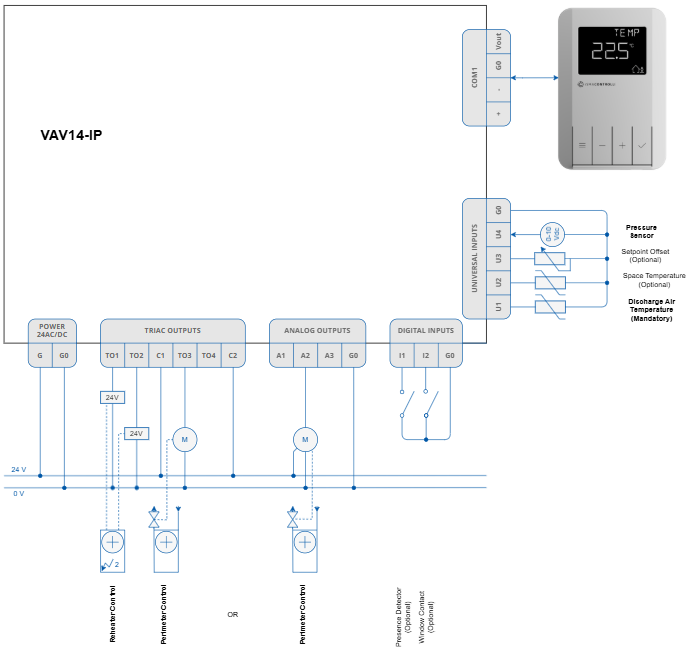
For the application to operate properly, it is required to connect the following elements:
-
pressure sensor connected to U4 input,
-
Control Point VAV panel or sensors on inputs (space temperature, setpoint offset sensor), and
-
DAT sensor located in the supply air duct after reheater.
Optionally, it is possible to connect the presence detector and window contact sensors to minimize energy efficiency loss. To control the reheater and perimeter, dedicated triac and analog output are available, as depicted on the diagram above.