
The SD card is a core of the UAC28-IP device. The SD card contains all software elements that guarantee a proper device functioning: real-time operating system and libraries.
The SD card is originally located inside the device. The card socket is placed on the side:
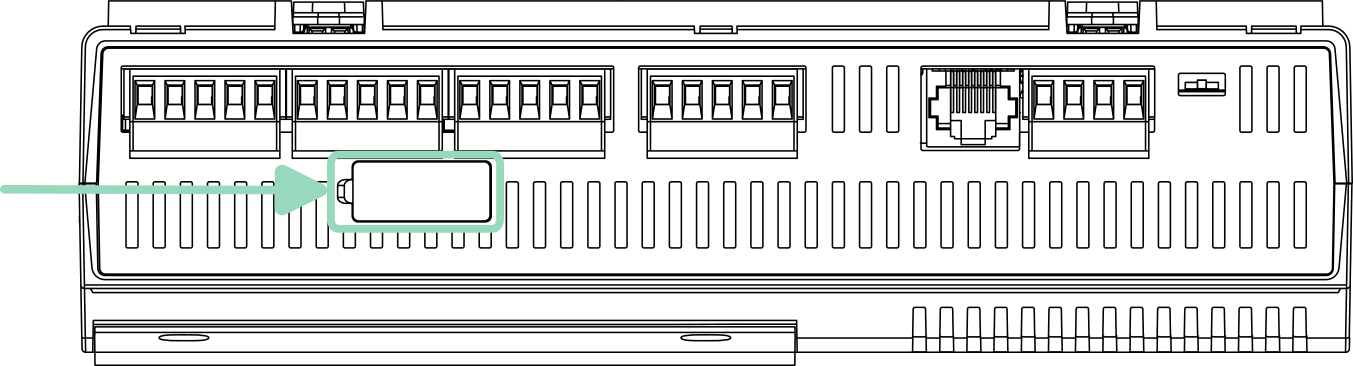
In case the device has suffered a hardware failure, it is possible to take the SD card out of the broken device and insert it into a replacement unit.
In order to access the SD card in the device:
-
Turn the power supply off.
-
Discharge any static electricity by touching a known, securely grounded object.
-
The SD card socket is located on the side of the device (as per the above figure). The socket is covered with a protective sticker. Use a thin object to lift the edge of the sticker to uncover the socket.
-
Remove the SD card by pushing the card in, until the spring release pushes the card partially out of the card socket. Grasp the card, and pull it completely out of the unit.
Warning
It it strongly not recommended to take out the SD card in any other situation other than a permanent hardware failure. Repeated lifting of the protective sticker may compromise its preventive features and reduce its durability.