
The Logs functionality, accessible in the Device Management Web Server, offers a debug possibility by gathering all of required logs and diagnostic data for troubleshooting. In problematic situations, such as when a station is not starting or it breaks the connection, logs are a convenient tool for the iSMA CONTROLLI Support Department to perform diagnostics and expedite the troubleshooting process.
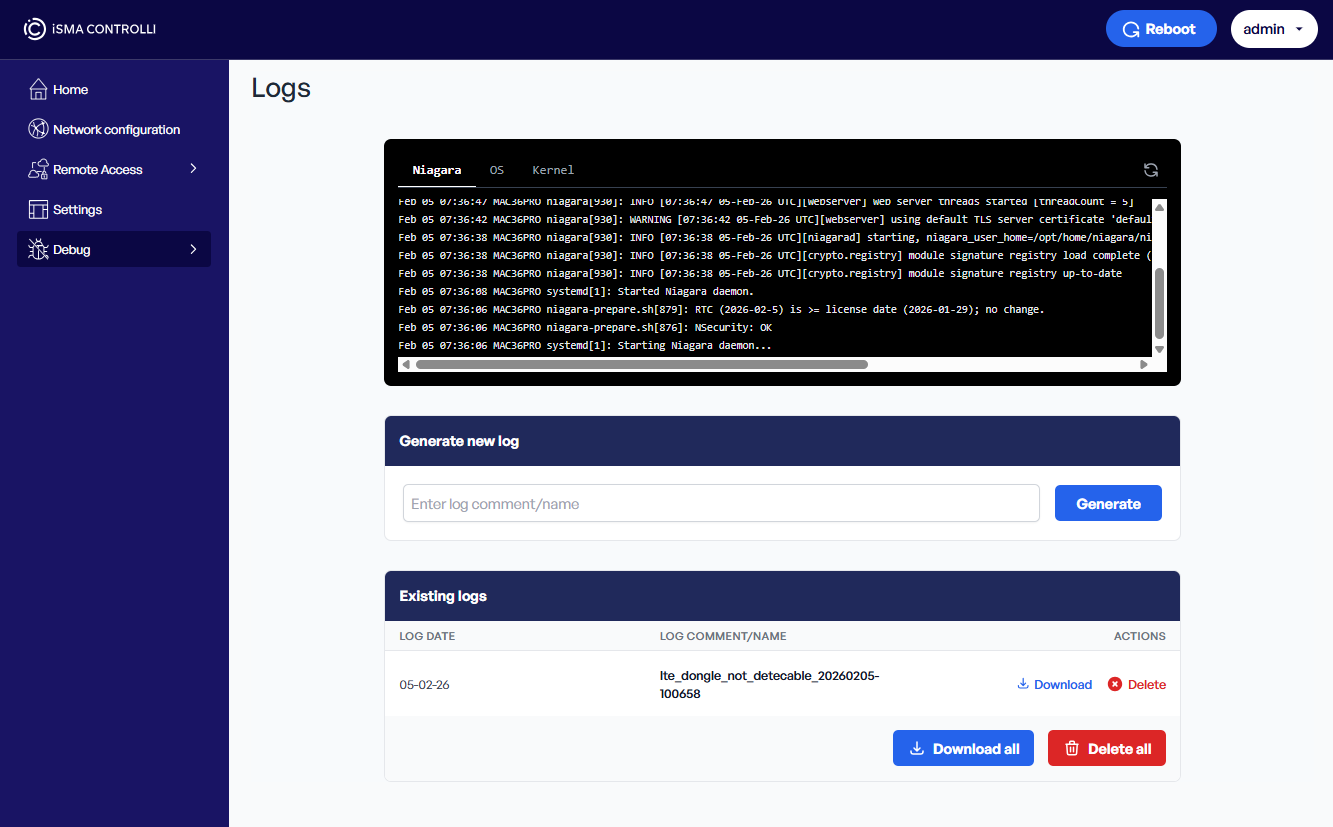
The logs available for preview are categorized into three groups:
-
Niagara: logs from platform,
-
OS: logs from any other applications/scripts executed on the MAC device,
-
Kernel: more HW/FW related logs directly from the kernel of Linux OS.
These logs are downloaded only once, when the web server page is opened. It is possible to refresh them with a Refresh icon or by reloading the web server page.
To learn more about the logs functionality in the Device Management Web Server, please see: Device Management Web Server.
Logs Packages
Logs packages are a convenient way to provide data for diagnostic purposes. The logs package contains logs and other diagnostic data such as RAM and disk usage, running processes, etc., which is more than the preview displayed in the logs tab of the Device Management Web Server. Such a package is easily generated in the Device Management Web Server, in the Debug section, Logs. Logs package is not encrypted and the user can review it before submitting it to the support department.
For clarity, it is recommended to name a log package indicating the issue: for example, lte_dongle_cannot_be_detected_<timestamp>.tar.gz. The name should be informative, clearly indicate the problem, and possibly differentiate before/after scenarios if it is possible to reproduce the issue.
Note
Please note that there is a limit of generated logs packages of 10 files. Once the 11th package is generated, the oldest package (1st) is removed.