
The ZAC24-IP-D as a nano EDGE ENGINE-driven controller offers a smart and easy way of creating applications.
The nano EDGE ENGINE application is cycle-driven, multithreaded, and can address multiple purposes. Structure of the nano EDGE ENGINE application is based on Application components, each of which defines a separate application thread and, possibly, a cycle of execution. In the device structure, the application refers to the following containers:
-
Applications;
-
Networks;
-
Services.
The Applications container is where the main logic is contained; the Networks container is where the external communication is configured, and the Services container is the place to connect with additional functionalities.
In order to create a fully functioning application follow these steps:
Step 1: Connection and networks configuration
Make sure that the device is correctly connected and set up. Detailed instructions are available in the device's ZAC24-IP-D Quick Start-up.
Go to the Networks container to configure the external communication settings (BACnet, Modbus, and/or DALI-2). Configure all the network-specific parameters there in order to enable proper communication as a client or server device in the Modbus TCP/IP or RTU, or BACnet IP or MS/TP protocol.
Remain in the Network container. Go to the LocalIO component, and configure all input and output components that are going to be utilized in the main application logic. The input and output components are grouped in the IO library, available in the Device Libraries window. Most importantly, set their addresses (the Address slot in each input or output component)—unless the addresses are set properly, the components are in fault statuses.
Step 2: Creating application
Go to the Applications container. This is the place to add Application components from the Core library—the nano EDGE ENGINE allows to add as many Application components to the container as necessary. Each application created this way is independent and cycle-driven. The Applications Manager is a view designed to manage Application components.
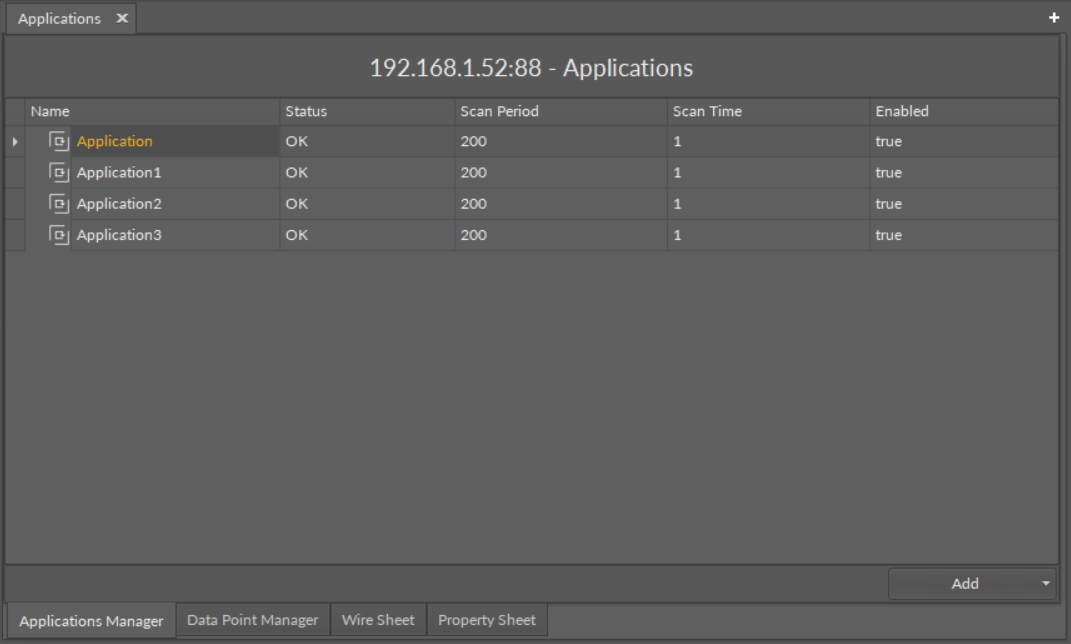
Tip - Lighting Application Cycle
Each Application component in the nano EDGE ENGINE environment can be set to a different scan period parameter, which defines an execution cycle of the application. In the case of the ZAC24-IP-D controller and lighting applications, it is recommended to set the application’s scan period to 100 ms.
(Recommended) Once all Application components are added to the Applications container, go to the Core library, and add Equipment components for each item controlled by the application. Then add Data Points to the Equipment components. It is advised to rename components to fit the application characteristics.
Application Structure for Tags
Applying tags in the nano EDGE ENGINE is based on a semantic approach that ensures consistent data structure which is easily usable by the nanoWebUI™ and by third-party systems. Tags are applied at the Equipment and Data Point levels, where Equipment serves as the logical container defining what is being controlled, and Data Points represent the measured or commanded values associated with that equipment. This structured model ensures that tagged data is immediately usable by platforms capable of communicating through standardized tag-based HTTP APIs, e.g., Haystack.
Note: Tags can be only applied to the Equipment components and Data Points. Other component types are not supported.
It is therefore recommended (however, not mandatory) to use the following structure when creating applications:
-
Applications container
-
Application component
-
Equipment component
-
Data Point(s)
-
other components
-
-
Equipment component
-
Data Point(s)
-
other components
-
-
-
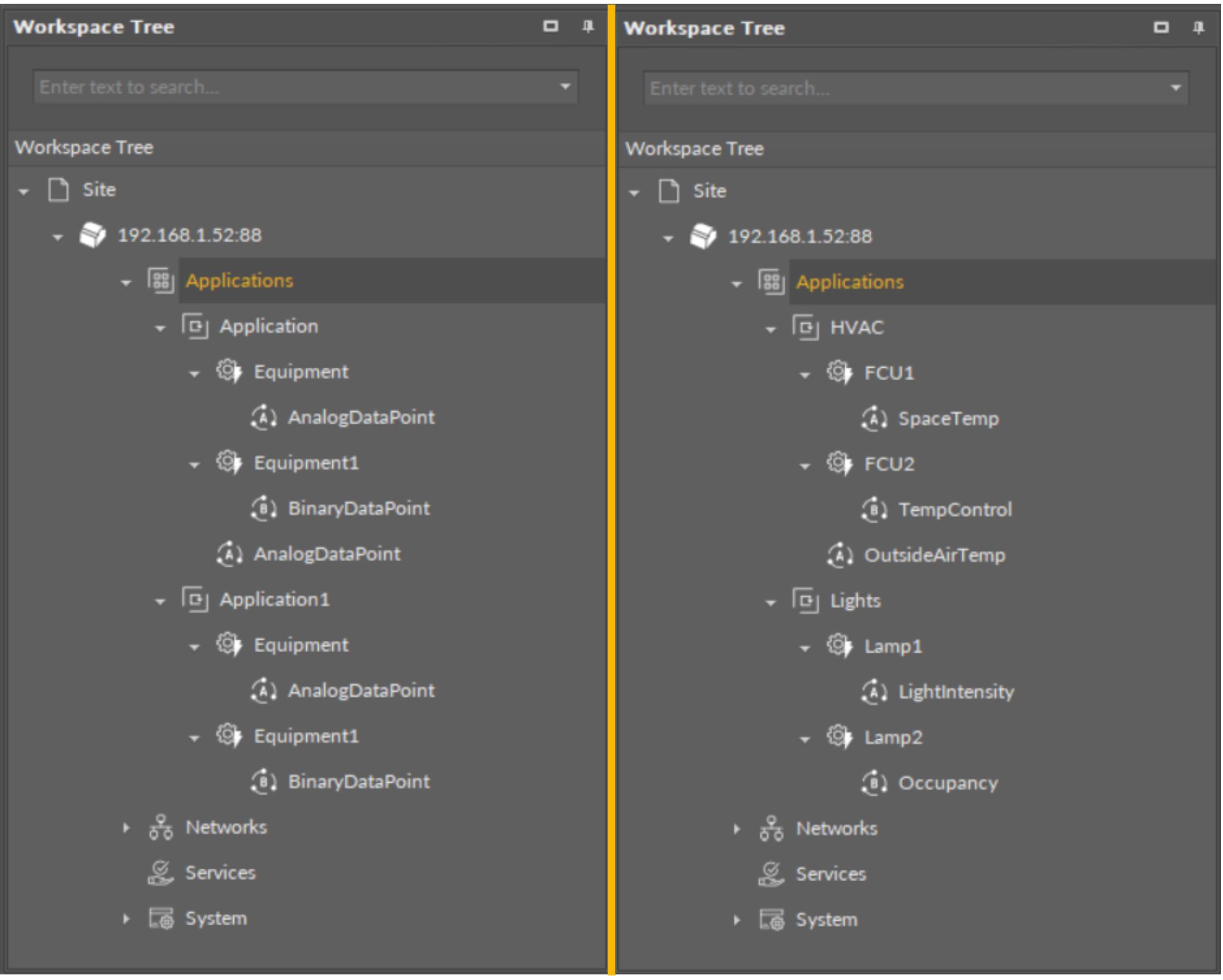
(Recommended) Start adding other components to the Equipment component (or components) to create logics with added Data Points. All components available for creating applications are grouped in libraries in the Device Libraries window.
Tip
Data Points are universal components that represent a value in the application logic; they may serve as setpoints, sensors values, non-volatile variables, or any other data values. Data Points represent a layer of the application logic that is presented to an end user—this is where the end user is able to adjust desired setpoints (e.g., for air conditioning) or invoke other actions included in the application logic. Data Points also read values calculated in applications and control local or remote outputs.
Data Points in the application logic may work as regular writable variables with priorities, or—with Reference linking—they may be connected with network points, such as local IO components.
-
AnalogDataPoint,
-
BinaryDataPoint,
-
MultistateDataPoint.
Tip
In the case of the ZAC24-IP-D controller, the functional components for lighting applications are located in the following nano EDGE ENGINE libraries:
-
DALI,
-
LightControl,
-
ComfortControl.
Step 3: Linking
Added component is ready to be linked. The nano EDGE ENGINE allows two methods of linking, standard and Reference linking. The Reference linking method is especially recommended to use to connect Data Points and network point class components. Detailed information is available in the Linking section.
Tip
Here is the list of other quick start-ups that offer detailed instructions on how to configure external communication, network points, explain linking methods, etc.: