
The PIRLightControl component provides a light control PIR loop that allows for an automated light control with the use of an occupancy sensor, bistable light switches, and day and night modes.
PIR Control Loop Operating Principles
The PIR control loop provides light control based on the occupancy status (see Occupancy Runtime description below) and/or manual switching the light on/off by a bistable switch.
The condition for the occupancy sensor to control the light is that the light switch remains on.
Once the light is switched on, either by the occupancy trigger or by the switch, the occupancy runtime is started. The light stays switch on until it is switched off by the switch or the occupancy runtime expires, whichever occurs first.
The Day Night Mode differentiates turning on the light based on the occupancy sensor (the light switch must be switched on).
If the Night Period is active:
-
the light will be turned on by the occupied state,
-
the light will be turned off either by the unoccupied state (runtime expired) or by the manual switch (if, during the Night Period, the light is turned off manually by the switch, the occupancy sensor will no longer work).
During the day (the Night Period is off):
-
the light will be turned on by the manual switch,
-
the light will be turned off either by the unoccupied state (runtime expired) or by the manual switch.
Occupancy Runtime
Occupancy runtime is a factor which impacts the functioning of the light control loop. While the occupancy sensor detects presence and during the time set in the Occupancy Runtime slot, the Light Output slot remains active. Occupancy runtime can be reset by pressing a button or by a signal from the occupancy sensor. The runtime timer starts counting down when the light is lit (either by a push button or an occupancy sensor).
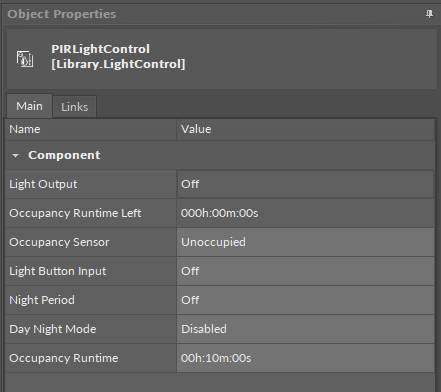
The PIRLightControl component has the following slots:
-
Light Output: the output value of the component, informs if the light is turned on (true) or off (false);
-
Occupancy Runtime Left: shows the time left until the occupancy runtime expires;
-
Occupancy Sensor: receives the signal from the occupancy sensor;
-
Available settings: occupied, unoccupied, null (set if there is no occupancy sensor, component acts as in unoccupied state);
-
-
Light Button Input: receives the state of the bistable light switch;
-
Night Period: allows to activate a defined night period;
-
Day Night Mode: allows to enable or disable functioning of the control loop in the day/night mode;
-
Occupancy Runtime: allows to set the time to uphold the occupancy when detected by the occupancy sensor and after the occupancy sensor no longer detects presence;