
Applicable to OS V1.10
The LightControlWithCLC1SwitchAndSecondaryLight is an advanced component for controlling the light, either by constant light control or manual dimming. It supports two zones for main and secondary lights, a single switch for main light, a single switch for secondary light, an occupancy sensor, and an occupancy runtime.
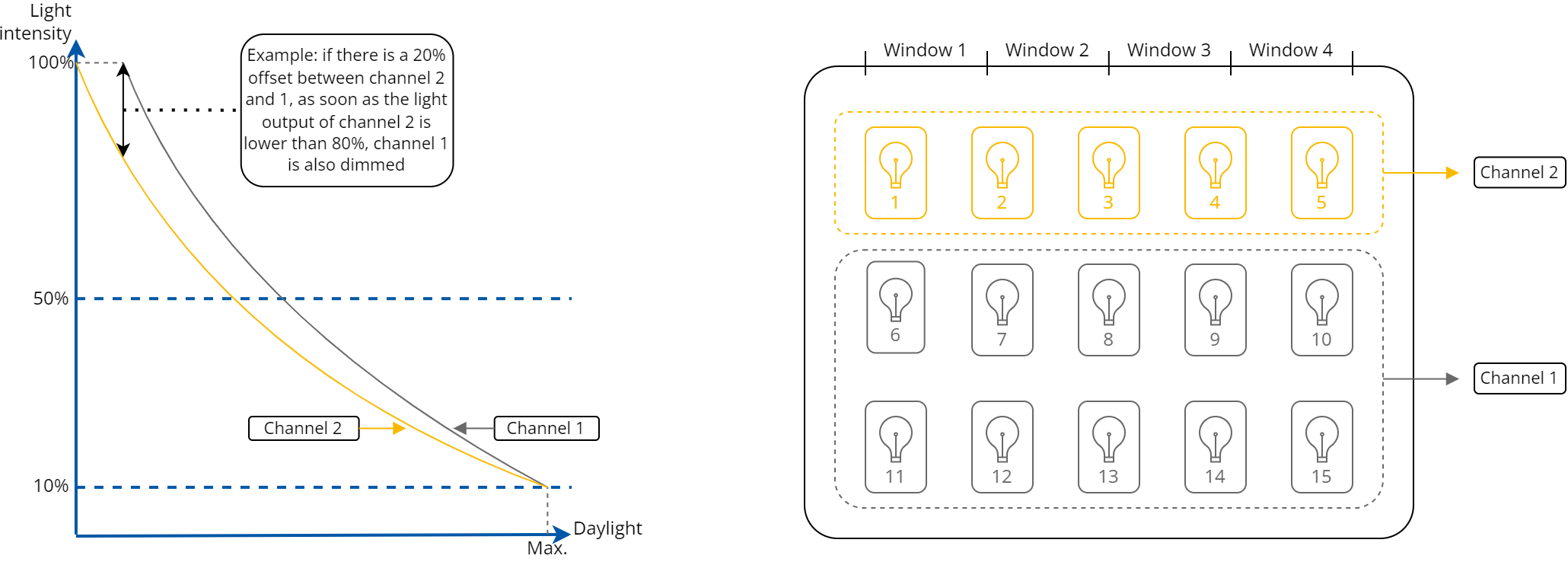
It can logically split the lamps into 2 groups (channels):
-
channel 1: located near the wall without the windows,
-
channel 2: located near the windows, which provide additional sunlight.
Because of an additional light source from windows, the lights in channel 2 can be controlled to be dimmer compared to the lights in channel 1.
Operating Modes
Under normal circumstances, the LightControlWithCLC1SwitchAndSecondaryLight component controls the light intensity based on the outcome of the Constant Light Control (CLC) PID control loop for main and secondary light channels, taking into account the occupancy factor. In certain cases, the CLC control loop can be overridden by using a manual dimming switch (dimming mode), direct command from the BMS (BMS mode), or an emergency mode.
CLC Mode
Occupancy Runtime
Occupancy runtime is a factor which impacts the functioning of the CLC control loop. While the occupancy sensor detects presence and during the time set in the Occupancy Runtime slot, the Light Enable and Channel1/Channel2 Light Level slots remain active. Occupancy runtime can be reset by pressing a button or by a signal from the occupancy sensor. The runtime timer starts counting down when the light is lit (either by a push button or an occupancy sensor).
The CLC mode operation is based on an integrated PID controller, which aims to achieve a set lux level by controlling the light levels of channel 1 and 2 as measured by a sensor connected to the Lux Sensor slot.
In the CLC mode, it is possible to set an offset between channels 1 and 2 to compensate for the additional light provided by windows. Example response from the PID controller in such a scenario can be seen in the figure below.
Time shift between channels
The important thing is that the controller needs to react fast for sudden light level drops (i.e., cloud obstructing the sun), but it should react more slowly in the opposite situation (sky clearing up). This is due to human perception of light and the fact that it is usually better perceived to have more light than not enough, while sudden changes in the light intensity are recognized as annoying.
This feature can be adjusted by the user by changing the Ramp Time slot value, which is the filtering time that slows down the control loop when the light should be dimmed down. By default, this value is set to 5 minutes.
CLC Control Cases
-
Light Enable: false, Occupancy Runtime: expired
-
light is switched off,
-
if the Lights Activation slot is set to Auto, a short press of the switch or a signal from an occupancy sensor results in turning on the light (the Light Enable slot set to true) and the light levels of channels 1 and 2 are controlled by the PID control loop according to the lux setpoint; occupancy runtime gets activated;
-
-
Light Enable: false, Occupancy Runtime: not expired
-
a signal from the occupancy sensor renews the runtime,
-
a short press on the switch turns on the light and renews the runtime;
-
-
Light Enable: true, Occupancy Runtime: not expired
-
a signal from the occupancy sensor renews the runtime,
-
a short press on the switch turns off the light and renews the runtime;
-
-
Light Enable: true, Occupancy Runtime: expired
-
the light is turned off.
-
Dimming mode
The dimming mode overrides normal operation of the CLC control loop on a long press of the switch. In this mode, light levels of channels 1 and 2 are controlled by the switch input (a long press performs dimming). As a default, first long press means dimming up to maximum (the light intensity gets increased) and each next long press toggles the dimming direction.
Dimming Mode Control Cases
-
Light Enable: false
-
a long press of the switch results in turning on the light (the Light Enable slot set to true) and light levels of channels 1 and 2 are set to a last stored value (set in parameters or saved when runtime expired), then starts to dim up if possible, and a runtime will start a countdown;
-
a signal from the occupancy sensor resets the runtime counter and, if the Lights Activation slot is set to Auto, it starts an auto mode (the Light Auto slot sets to true);
-
a short press turns on the light (the Light Enable slot sets to true) and enables an auto mode (the Light Auto slot sets to true);
-
-
Light Enable: true, Control Mode: CLC
-
a long press of the switch, the dimming up starts from the current light level;
-
each long press starts dimming the light levels of channels 1 and 2 by a step and interval defined in the Dimm Step and Long Press Time parameters, starting with dimming up; each next long press toggles the dimming direction;
-
each long press resets the occupancy runtime counter;
-
a signal from the occupancy sensor resets the occupancy runtime counter;
-
a short press turns off the light (the Light Enable slot sets to false) and the light levels of channels 1 and 2 are set to 0, control mode is set to CLC.
-
Secondary Light Control
The secondary light control follows the main light control until a secondary light switch is pressed, either to turn off or dim the light. The secondary light no longer follows the main light but acts as an independent light group. Light can be turned on/off with the short press of the secondary light switch and dimmed up/down with the long press. Using the secondary light switch also renews the occupancy runtime. When the runtime expires, all lights will turn off and all will go back to the CLC mode.
BMS Mode
The BMS mode can be activated only when the light is turned off (the Light Enable slot is false). It is activated by providing a true value to the BMS Input. Once activated, light levels of channels 1 and 2 will be set to predefined values (separate for both channels, specified in the Channel1/Channel2 Bms Light Level parameters) and the Light Enable slot will be set to true. This mode is deactivated once the BMS Input is set to false or another mode is activated (either by a button or an occupancy sensor).
Emergency Mode
The emergency mode overrides all other modes as long as the Emergency Input stays true. If activated, the Light Enable is set to true and the light levels of channels 1 and 2 are set to a predefined common value (specified in the Emergency Light Level parameter). When going back to normal operation, both Light Enable and light levels of channels 1 and 2 are controlled by the last operation mode in use. The occupancy runtime is still running in this mode. When the Emergency Input returns to false, the light reverts to its previous state. If the occupancy runtime expires, indicating that the room is unoccupied, the light will turn off.
Slots
The LightControlWithCLC1SwitchAndSecondaryLight component has the following slots:
-
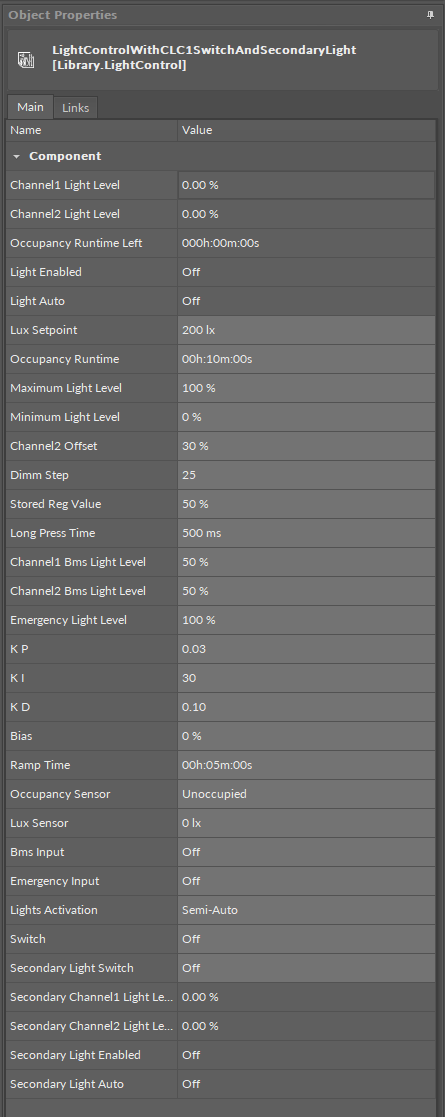
Channel1/Channel2 Light Level: shows the calculated channel 1 or 2 main light intensity setpoint;
-
Occupancy Runtime Left: shows the time left until the occupancy runtime expires;
-
Light Enabled: shows that the main light is turned on (true) or off (false) as a result of any of the operating modes: the CLC mode, dimming mode, BMS mode, or emergency mode;
-
Light Auto: shows that the main light is turned on (true) or off (false) as a result of the CLC mode;
-
Lux Setpoint: allows to set the setpoint for the CLC control loop;
-
Occupancy Runtime: allows to set the time to uphold the occupancy when detected by the occupancy sensor and after the occupancy sensor no longer detects presence;
-
Maximum Light Level: allows to set the maximum value of channel 1 and 2 light level in the dimming and CLC modes;
-
Minimum Light Level: allows to set the minimum value of channel 1 and 2 light level in the dimming and CLC modes;
-
Channel2 Offset: allows to set the value for the light level offset between channel 1 and 2 (only in the CLC mode);
-
Dimm Step: defines the value of light intensity increase or decrease every long press;
-
Stored Reg Value: allows to set the value that would be stored after the dimming mode is turned off; next time a long press occurs, the lights are turned on with intensity defined in this slot; by default, this value is written from the Channel1/Channel2 Light Level slot taken right before the Occupancy Runtime changes to expired;
-
Long Press Time: defines the time for the long press function and—when long press function is detected—the time interval for executing dimming steps; by default, 500 ms;
-
Channel1/Channel2 Bms Light Level: allows to set the light levels of channel 1 or 2 when the operating mode gets overridden by BMS;
-
Emergency Light Level: allows to set the light levels of channel 1 and 2 when the operating mode gets overridden by emergency;
-
KP/KI/KD/Bias: allows to set the KP, KI, KD, bias parameters for the CLC control loop;
-
Ramp Time: defines the filtering time that slows down the control loop when light should be dimmed down;
-
Occupancy Sensor: receives the signal from the occupancy sensor;
-
Available settings: occupied, unoccupied, null (set if there is no occupancy sensor, component acts as in unoccupied state);
-
-
Lux Sensor: receives the signal for the light level sensor;
-
Bms Input: receives the signal from the BMS and activates the BMS mode;
-
Emergency Input: receives the emergency signal and activates the emergency mode;
-
Lights Activation: allows to configure how lights are activated,
-
Available settings: Semi-auto (lights are activate by push buttons, the occupancy sensor only renews runtime), Auto (lights are activated automatically based on the occupancy sensor);
-
-
Switch: receives a signal from a connected monostable switch for the main light control; on a rising edge switches on/off or increases/decreases the intensity of the main light;
Note
Until the Secondary Light Switch slot receives a signal from a secondary light monostable switch, the Switch slot controls both main and secondary lights.
-
Secondary Light Switch: receives a signal from a connected monostable switch for the secondary light control; on a rising edge acts as defined for a long or short press and renews runtime:
-
long press: enables a manual mode and increases/decreases the secondary light,
-
short press: enables a manual mode and turns on/off the secondary light;
-
Note
When the runtime expires after a rising edge on the Secondary Light Switch, the secondary light control goes back to following the main light control.
-
Secondary Channel1/Channel2 Light Level: shows the calculated channel 1 or 2 secondary light intensity setpoint;
-
Secondary Light Enabled: shows that the secondary light is turned on (true) or off (false);
-
Secondary Light Auto: shows that the secondary light is turned on (true) or off (false) as a result of the CLC mode.
Extensions
DALI
The DALI extension is dedicated to light control in controllers that natively support the DALI protocol. The DALI network has to be configured on the controller for the extension to work properly.
The DALI extension allows the component to connect to a DALI device and control it directly through the DALI network. The extension allows to send commands to a single DALI device, a group of devices, or broadcast to all devices on the network, through an encoded output.
The extension is added from the context menu of the component (Add Extension>DALI).
To process the light control, the DALI extension has to be linked directly to the EncodedSendCommand component in the DALI network:
-
the Channel1 Encoded Output or Channel2 Encoded Output slot to the Encoded Input slot, or
-
the Secondary Channel1 Encoded Output or Secondary Channel2 Encoded Output slot to the Encoded Input slot.
The DALI extension has the following slots:
-
Channel1/2 Dali Address and Secondary Channel1/2 Dali Address: sets the short address of the DALI device or a group DALI devices to be controlled by the component,
-
Channel1/2 Dali Address Type and Secondary Channel1/2 Dali Address Type: allows to select the target device(s) to send out the command;
-
Available settings: Single, Group, All;
-
-
Channel1/2 Encoded Output and Secondary Channel1/2 Encoded Output: a 4-byte output value containing information about a command (specified to the component), and its value specified to be sent out to the addressed device(s):
|
Byte |
Byte 3 (MSB) |
Byte 2 |
Byte 1 |
Byte 0 |
|---|---|---|---|---|
|
Type of encoded information |
Address type |
Address |
Command |
Value |
|
Value |
1 |
5 |
0 |
254 |
|
Final encoded input |
17105150 |
|||
-
Control Deadband: allows to set a range of value (in %) which does not trigger any change of the Channel1 Dali Encoded Output slot.
DALI Gateway
The DALI Gateway extension is dedicated to light control in controllers that do not natively support the DALI protocol.
The DALI Gateway extension enhances the component’s functionality by providing a possibility to work through the DALI protocol. The extension allows to determine the DALI device or group of DALI devices to control. With the use of the extension it is also possible to broadcast DALI commands to all connected devices.
The extension is added from the context menu of the component (Add Extension>DALI Gateway).
To process the light control, the LightControlWithCLC1SwitchAndSecondaryLight/LightControlWithCLC2SwitchAndSecondaryLight component has to be linked to the network point component:
-
the Channel1/Channel2 Modbus Address slots should be linked to the Modbus network point’s Address slot, or
-
the Secondary Channel1/Channel2 Modbus Address slots should be linked to the Modbus network point’s Address slot, and
-
the Channel1/Channel2 Modbus Value slots should be linked by Reference through the Data Point to the Modbus network point, or
-
the Secondary Channel1/Channel2 Modbus Value slots should be linked by Reference through the Data Point to the Modbus network point.
The above values determine the value to send and the address of the DALI device to send the command to.
-
Channel1 Dali Address/Secondary Channel1 Dali Address: sets the short address of the DALI device or a group DALI devices of channel 1 main/secondary light to be controlled by the component,
-
Channel1 Dali Address Type/Secondary Channel1 Dali Address: allows to set a proper Modbus address slot for a linked network point depending on a number of DALI devices of channel 1 main/secondary light to be controlled (single/group/all),
-
Available values:
-
None: Modbus address is null,
-
Single: Modbus address is 510,
-
Group: Modbus address is 520,
-
All: Modbus address is 530;
-
-
-
Channel1 Modbus Address/Secondary Channel1 Modbus Address: the output slot with the Modbus address indicating the destination DALI network point of channel 1 main/secondary light to send the DALI command to;
-
Channel1 Modbus Value/Secondary Channel1 Modbus Value: the 16-bit output value comprised as follows:
-
upper 8 bits: 15-8:
-
short address of a single lamp 0-63 for lamp 1 to 64, or
-
short address of a group of lamps 0-15 for a lamp group 1 to 16;
-
-
lower 8 bits: light intensity 0-254.
-
To avoid sending to many requests by the DALI gateway, the Channel1/2 Modbus Value and Secondary Channel1/2 Modbus Value slots would be updated every time the light level is higher or lower by 3% than one previously set on the output. This value can be set in the Control Deadband slot.
-
Channel2 Dali Address/Secondary Channel2 Dali Address: sets the short address of the DALI device or a group DALI devices of channel 2 main/secondary light to be controlled by the component,
-
Channel2 Dali Address Type/Secondary Channel2 Dali Address: allows to set a proper Modbus address slot for a linked network point depending on a number of DALI devices of channel 2 main/secondary light to be controlled (single/group/all),
-
Available values:
-
None: Modbus address is null,
-
Single: Modbus address is 510,
-
Group: Modbus address is 520,
-
All: Modbus address is 530;
-
-
-
Channel2 Modbus Address/Secondary Channel2 Modbus Address: the output slot with the Modbus address indicating the destination DALI network point of channel 2 to send the DALI command to;
-
Channel2 Modbus Value/Secondary Channel2 Modbus Value: the 16-bit output value comprised as follows:
-
upper 8 bits: 15-8:
-
short address of a single lamp 0-63 for lamp 1 to 64, or
-
short address of a group of lamps 0-15 for a lamp group 1 to 16;
-
-
lower 8 bits: light intensity 0-254.
-
The Channel1/2 Modbus Value and Secondary Channel1/2 Modbus Value values are set according to the formula (respectively, for the secondary light slots):
Channel1 Modbus Value = (Channel1/2 Dali Address - 1) * 256 + Channel1/2 Light Level,
where:
Channel1/2 Dali Address = short DALI device address or DALI group address;
Channel1/2 Light Level = 0-254 value corresponding to the % out value of the Channel1 Light Level slot.
-
Control Deadband: allows to set a range of value (in %) which does not trigger any change of the Channel1/2 Modbus Value and Secondary Channel1/2 Modbus Value.