
Applicable to OS V1.9
The Tagging service provides centralized management of semantic tags for Data Points and equipment, ensuring consistent and standardized metadata assignment across the local control system. It supports both automatic and manual tagging mechanisms, allowing automatic tag generation to be enabled or disabled, as well as manual tag assignment based on available tag dictionaries.
Tags in BMS
Tags are labels or key-value pairs that provide metadata to identify, categorize, and organize data from devices and systems like HVAC, lighting, or security. They enable interoperability by providing a standardized way to understand data from different sources, which improves data quality, facilitates automation, simplifies integration, and allows for more efficient data analysis.
The Tagging service requires the Tagging library and is automatically available in the Services container once the Tagging library is installed on the device. The Tagging library is a default part of the nano EDGE ENGINE from the OS V1.9 and is not compatible with earlier versions.
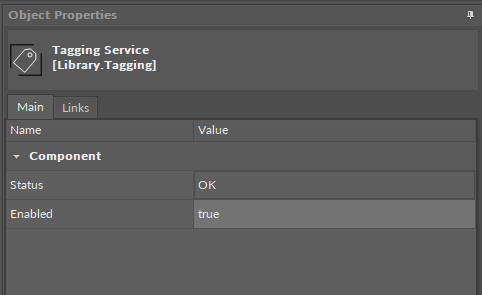
The Tagging service has the following slots:
-
Status: indicates the current status of the component. If the component works properly, its status is OK; however, it changes accordingly when values in other slots are adjusted.
-
Available information: disabled (the Enabled slot is set to false), OK;
-
-
Enabled: change of the slot's value enables or disables the component.
Tag Dictionaries
Tag dictionaries are libraries containing lists of tags, which can be applied to Data Points and the Equipment component. Tag dictionaries are searchable and contain labels, which allow for the clear and efficient structure management, data modelling, and faster data processing by local control systems.
There are two tag dictionaries available: Haystack and Webserver.
Haystack
The list of tags in the Haystack tag dictionary corresponds with the Haystack standard: Tags in Project Haystack; however, there are some differences. The Haystack tag dictionary does not include the following tags:
Haystack Tags Exceptions
list, dict, grid, scalar, xstr, choice, symbol, is, na, remove, of, quantities, quantityOf, tagOn, tags, containedBy, contains, def, defx, inputs, outputs, reciprocalOf, relationship, span, mlIdentificationPeriod as well as tags of types: feature, filetype, lib, op, list, dict, grid.
These tags are not relevant for the data modelling based on Data Points and the Equipment component (in the application structure).
Webserver
The tags of the Webserver tag dictionary allow for a seamless display of tagged elements in the nanoWebUI™. The list of Webserver dictionary includes:
|
Tag |
Auto-tag |
Description |
|---|---|---|
|
|
Yes (ADP, BDP, MDP) |
Shows which application the Data Point belongs to (for the nanoWebUI order) |
|
|
Yes (ADP, BDP, MDP) |
Defines the Data Point’s visibility on the nanoWebUI (editable) |
|
|
Yes (ADP, BDP, MDP) |
Defines the widget type to display on the nanoWebUI (editable) |
|
|
Yes (ADP, BDP, MDP) |
Defines the order of widgets displayed on the nanoWebUI |
|
|
Yes (ADP) |
Allows to configure the display of decimal point on the nanoWebUI (editable) |
|
|
Yes (ADP) |
Allows to configure the step value change for the nanoWebUI (editable) |
|
|
No (manually added) |
Sets the nanoWebUI as a web browser's homepage |
Note
To learn more about the display of the tagged elements in the nanoWebUI™, please see the nanoWebUI™ description.
Using Tags
Applying tags in the nano EDGE ENGINE is based on a semantic approach that ensures consistent data structure which is easily usable by the nanoWebUI™ and by third-party systems. Tags are applied at the Equipment and Data Point levels, where Equipment serves as the logical container defining what is being controlled, and Data Points represent the measured or commanded values associated with that equipment. This structured model ensures that tagged data is immediately usable by platforms capable of communicating through standardized tag-based HTTP APIs, e.g., Haystack.
Note: Tags can be only applied to the Equipment components and Data Points. Other component types are not supported.
It is therefore recommended (however, not mandatory) to use the following structure when creating applications:
-
Applications container
-
Application component
-
Equipment component
-
Data Point(s)
-
other components
-
-
Equipment component
-
Data Point(s)
-
other components
-
-
-
A required condition for using tags is that the Tagging library is installed on the device and the Tagging service is available in the Services container. Both are a default part of the nano EDGE ENGINE V1.9 and are not compatible with previous versions.
Tags are available in two formats: auto-tagging and manually added.
Auto-tagging
Auto-tagging is a feature required for a correct and efficient display of the nanoWebUI and is available for Data Points and the Equipment component. The list of auto-tags and exact details of applying auto-tags to Data Points and Equipment are available here:
Manually Added Tags
Apart from the auto-tagging feature, it is possible to manually select tags from the available tag dictionaries.
Tag dictionaries are libraries containing lists of tags, which can be applied to Data Points and the Equipment component. Tag dictionaries are searchable and contain labels, which allow for the clear and efficient structure management, data modelling, and faster data processing by local control systems.
There are two tag dictionaries available: Haystack and Webserver (for details, see the above Tag Dictionaries section).
The exact details of manually applying tags to Data Points and Equipment are available here:
Dedicated views
Views dedicated to the Tagging service are available in the iC Tool: iC Tool - Tag Manager and iC Tool - Tags Tab, and nE2 Link module: nE2 Link - Tagging.