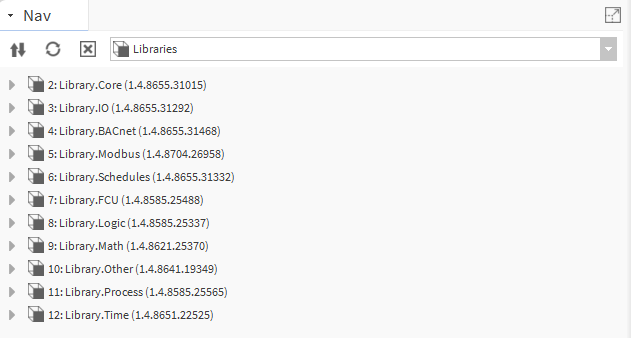
nano EDGE ENGINE Libraries
nano EDGE ENGINE enables real-time device programming using components from libraries installed on the device. Application programming on the controller is done in the Applications container. The nano EDGE ENGINE controller can run multiple applications in different time cycles, running simultaneously.
To learn more about the Applications, please refer to the nano EDGE ENGINE Programming user manual.
To start programming, make sure that the required libraries are installed on the device.
To learn more about the nano EDGE ENGINE libraries and components, please refer to the nano EDGE ENGINE Programming user manual.
Installing Libraries
Software Manager is the tool designed to manage (install, uninstall, upgrade, downgrade) nano EDGE ENGINE OS and libraries. To start programming applications, first, go to the Software Manager and make sure that the OS is installed in the required version and all required libraries are installed in relevant versions.
Programming
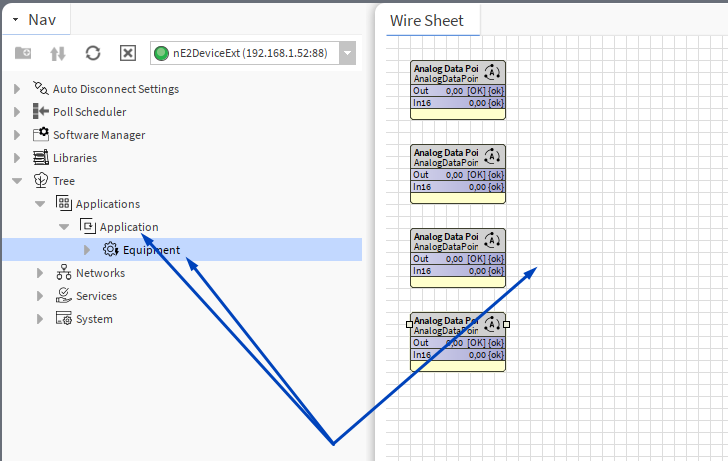
Programming of the nano EDGE ENGINE devices is typically carried out by dragging and dropping components from the installed libraries (either directly from the nE2 Link module or from the Libraries folder in the device tree, see sections below) to the Applications container. It is possible to drop the components directly to the device tree or onto the wire sheet (in this case, the wire sheet must be opened for the Application or Equipment component).
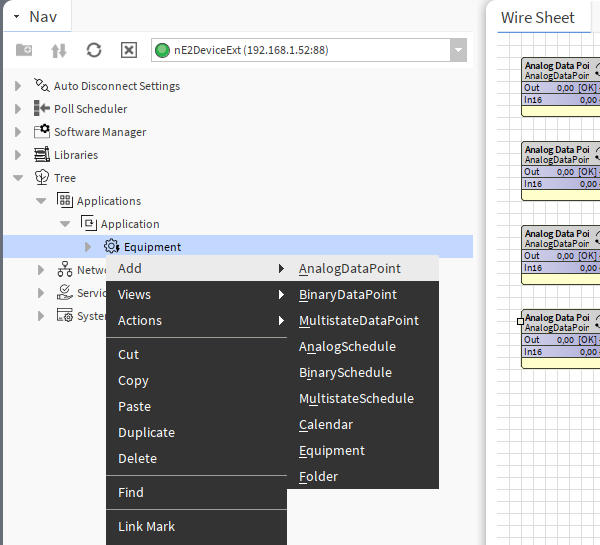
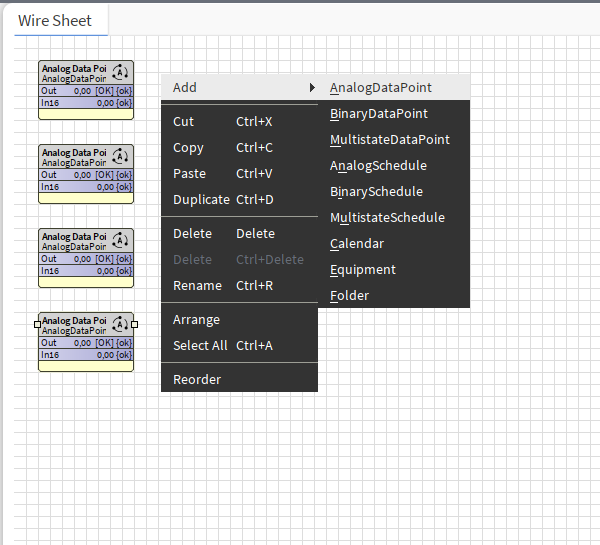
Basic components (Data Points, schedules, calendar, and folder-type components) can be added by right-clicking on the Application/Equipment or directly on the wire sheet.
Note
All the Data Points required for the application programming are stored in the Library.Core. To learn more about the Core library and its components, please refer to the nano EDGE ENGINE Programming user manual.
Application Structure
The nano EDGE Engine organizes the application structure using a clear, hierarchical model designed for scalable, logical, and intuitive system configuration. The architecture is designed to support the tagging functionality for efficient data modelling.
Applying tags in the nano EDGE ENGINE is based on a semantic approach that ensures consistent data structure which is easily usable by the nanoWebUI™ and by third-party systems. Tags are applied at the Equipment and Data Point levels, where Equipment serves as the logical container defining what is being controlled, and Data Points represent the measured or commanded values associated with that equipment. This structured model ensures that tagged data is immediately usable by platforms capable of communicating through standardized tag-based HTTP APIs, e.g., Haystack.
Note: Tags can be only applied to the Equipment components and Data Points. Other component types are not supported.
It is therefore recommended (however, not mandatory) to use the following structure when creating applications:
-
Applications container
-
Application component
-
Equipment component
-
Data Point(s)
-
other components
-
-
Equipment component
-
Data Point(s)
-
other components
-
-
-
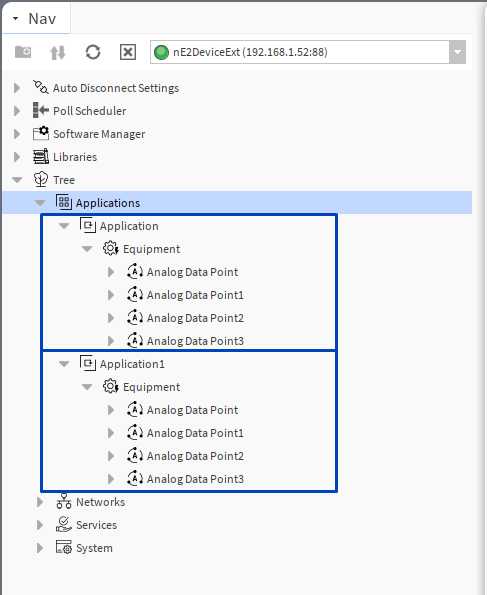
To find out more about the tagging functionality for data modelling and nanoWebUI™ interface, please refer to the Tagging, Haystack, and Web services.
Programming with Libraries in nE2 Link Module
From the V1.7 and up, the nE2 Link module provides nano EDGE ENGINE libraries to install on the device (using the Software Manager).
Important - compatible versions
In order to use libraries available directly in the nE2 Link module, it is required to make sure that the controller is upgraded to the latest version supported by the nE2 Link. To check it, go to the Software Manager and see if the OS or any library is marked as outdated or available to install. If so, perform an upgrade and/or installation of required elements.
If - for any reason - the OS/library versions are not the same as the nE2 Link version and they cannot be upgraded because of any system requirements, it is recommended to use the components coming from the device tree (see the Programming from Device Libraries section below).
In the Palette of the nE2Link module there is the Libraries folder with all nano EDGE ENGINE libraries available to install on the device:
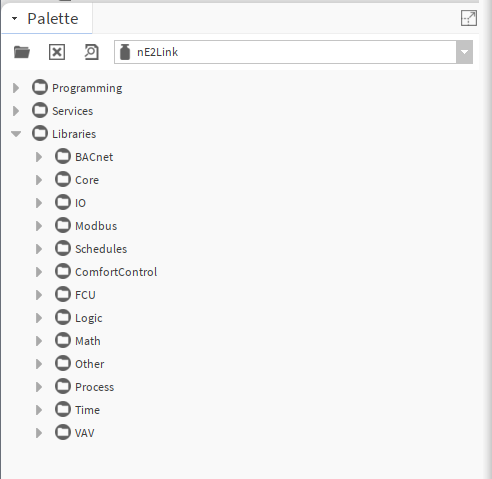
Programming of the nano EDGE ENGINE applications is typically carried out by dragging and dropping components in the Applications container, under the Application component.
Components can be dragged and dropped directly from the Palette folder.
Important
When adding components from the Palette window, all libraries and components will be visible on the list, but only components from the libraries installed on the device can be effectively added to the application.
Programming with Device Libraries
The user can program the nano EDGE ENGINE device using installed libraries and components found in the Libraries folder.
The libraries on the device act as a palette of components that can be dropped into the device logic. If the user does not have a dedicated module with nano EDGE ENGINE libraries, it is possible to use those installed on the device.
Libraries installed on the device are accessible in the device tree:
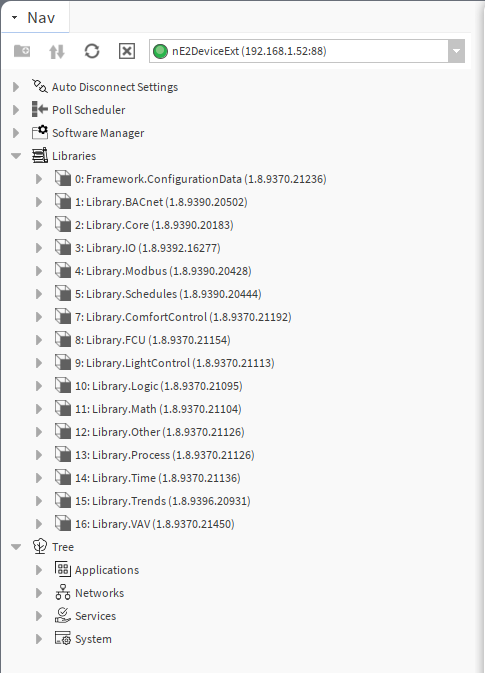
The libraries on the device act as a palette of components that can be dropped into the device logic. To enhance the user experience, it is recommended to open an additional nav view for the Libraries view:
-
in Workbench, go to Window → Sidebar → Nav. Select Nav.
A new Nav view will appear on the left bottom side of the Workbench view. Navigate to the nE2DeviceExt, right-click on the Libraries folder, and select Go Into.
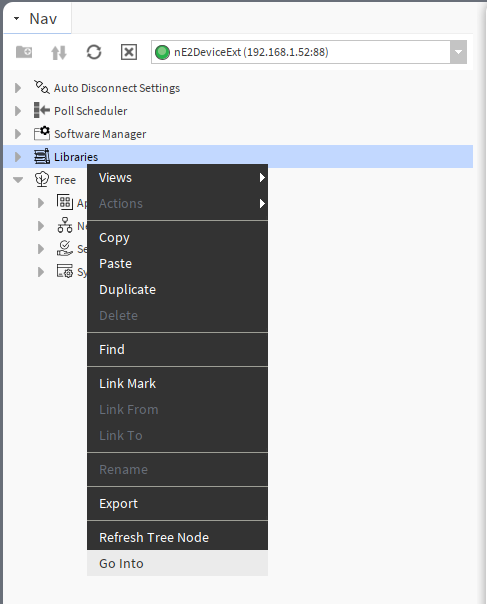
An on-device libraries list will appear.