
The LpTemperatureSensor component is responsible for reading values and configuration of the temperature sensor in the iSMA-B-LP device.
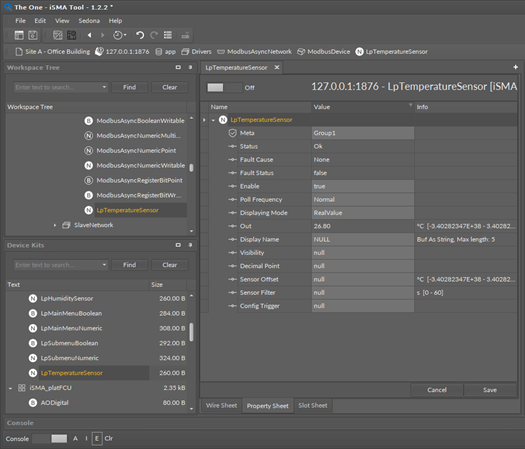
The LpTemperatureSensor component
The LpTemperatureSensor component has the following slots:
-
Status: shows the component’s status;
-
Fault Cause: shows the fault cause description;
-
Fault Status: informs about the point error status (true: point read/write error);
-
Enable: enables or disables the component (true: enabled, false: disabled);
-
Poll Frequency: allows to set the reading poll frequency (fast, normal, slow);
-
Displaying Mode: allows to set the displaying mode (RealValue: the output value is divided by 10; RegisterValue: the value is taken directly from the register);
-
Out: the temperature sensor value output slot;
-
Display Name: allows to set the temperature sensor display name on the LCD display (up to 4 characters, only ASCII characters);
-
Visibility: activates or inactivates the sensor value on display;
-
Decimal Point: allows to set the display of the decimal point (inactive, decimal point on first, second, or third position);
-
Sensor Offset: sets the temperature sensor offset value;
-
Sensor Filter: sets the temperature sensor reading filter time in seconds;
-
Config Trigger: on rising edge sends configuration parameters to the device components (Display Name, Visibility, Decimal Point, Sensor Offset, Sensor Filter).
The LpTemperatureSensor component has the following actions:
-
Read: reads the iSMA-B-LP panel’s temperature sensor value and updates the Out slot;
-
Read Config: reads configuration parameters from the iSMA-B-LP panel (Display Name, Visibility, Decimal Point, Sensor Offset, Sensor Filter);
-
Write Config: writes configuration parameters to the iSMA-B-LP panel (Display Name, Visibility, Decimal Point, Sensor Offset, Sensor Filter).