
The Serial component allows to configure the Modbus RTU communication over the RS485 port.
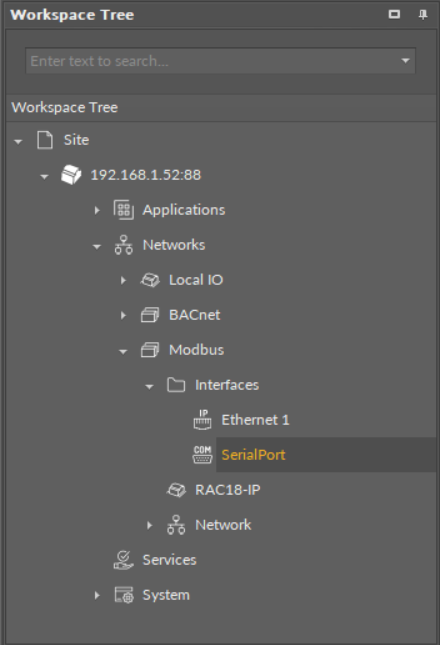
The Serial component
The Serial component has the following slots:
-
Status: indicates the current status of the component. If the component works properly, its status is OK; the component's status becomes Disabled if its Enabled slot has been set to false.
-
Available information: Disabled, OK.
-
-
Enabled: change of the slot's value enables or disables the component.
-
Available settings: true (enabled), false (disabled).
-
Note: If the Enabled slot is in false (meaning the component is disabled), the Status slot becomes Disabled.
Note: By default, the component is enabled.
WARNING!
If the Serial component is disabled, the network configured to operate on the serial port defined in this component is also disabled.
-
Serial Port: shows a serial communication port available in the device;
-
Baud Rate: allows to set the baud rate;
-
Available settings: 2400, 4800, 9600, 19200, 38400, 57600, 115200 bps;
-
-
Data Bits: shows the data bits configuration of the Modbus data frame;
-
Available information: 8 bits (Modbus RTU);
-
-
Stop Bits: allows to set the stop bits configuration of the Modbus data frame;
-
Available settings: One, OnePointFive, Two;
-
-
Parity: allows to set the parity bit configuration of the Modbus data frame;
-
Available settings: None, Even, Mark, Odd, Space.
-
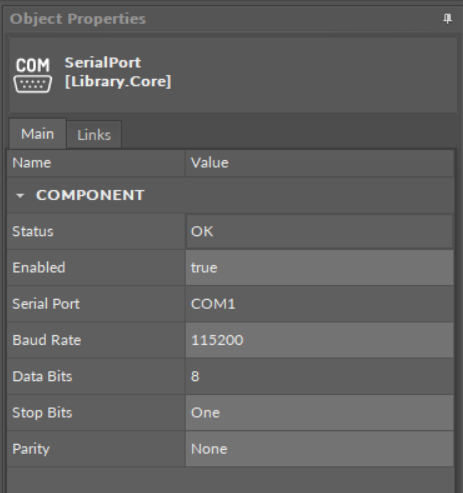
The Serial component slots